Most life coaches don’t set out to build a software stack. It just happens. You use the calendar you already have, keep notes wherever they are easiest to find, add Zoom or Meet, and sort out payments separately.
That can work perfectly well for a while. Then the client list grows, programs get added, or you spend ten minutes before a session looking for something you know you wrote down somewhere.
This is usually when a life coach app starts to earn its place.
The five platforms below can all help run a coaching business, but they approach the job differently. Quenza puts more weight on what clients do between sessions. HoneyBook comes at it from running a service business. upcoach is built around structured programs. Simply.Coach centers the coaching engagement itself. Knowing that difference is far more useful than starting with five pricing pages.
TL;DR
Start with the kind of coaching business you run. The shortlist gets much smaller from there.
- Quenza: strong on exercises and structured work between sessions.
- HoneyBook: contracts, payments and general client administration.
- Simply.Coach: ongoing coaching relationships, from goals and sessions to actions and progress.
- upcoach: structured 1:1 and group programs, cohorts and similar formats.
- Simplero: coaching alongside courses, email, communities and digital products.
Once two or three feel relevant, compare the plan that fits your caseload. That is also the point to look at transaction fees, payment-processing costs and features that begin on a higher tier.
Two Questions to Answer Before You Compare Anything

Before looking at features, think about what you are actually trying to fix. Two questions usually make that clear.
Who is the app really for?
“Life coach app” gets used for two quite different products. One is mainly for the person being coached. Apps such as Hapday, Rocky.ai and Finch sit closer to self-guided support, with things like prompts, habit tracking and activities.
The apps in this comparison are for the coach. They help you run or deliver the practice: keeping track of clients, sessions, scheduling, contracts, payments or the work that happens between calls.
Life coaching also shares many of these needs with other forms of professional coaching. For a broader comparison, see our guide to the top coaching apps for 2026.
What does a normal week of coaching look like for you?
This is where the five platforms start to separate. If you mostly coach one-to-one, you probably care about being able to open a client’s record and quickly understand where the work stands: what happened last time, what they are working toward and what comes next.
If clients regularly leave sessions with exercises or reflections, between-session delivery becomes a bigger part of the decision.
Run cohorts or structured programs? You need several people moving through the same experience without losing sight of individual progress. Sell courses as well? Content, email and checkout may deserve more attention than a traditional session workflow.
You may do more than one of these. Most practices aren’t perfectly tidy. Start with the work you do most often.
What Do You Actually Need the App to Do?
For a one-to-one coaching practice, six jobs cover most of the basics:
- Client records: enough history and context to pick up the relationship where you left it.
- Session notes: easy to write now and easy to find later.
- Scheduling: a booking process that works with the calendar you already use.
- Contracts: agreements you can sign and keep with the client record.
- Payments: invoices, payment plans or recurring billing where needed.
- Between-session work: goals, actions, exercises, worksheets or check-ins.
Not every coach needs the same depth in all six. A coach who rarely assigns exercises may not care about an activity library. Someone selling monthly packages may care a great deal about contracts, scheduling and recurring payments.
That is also the difference between general business software and software built specifically for coaching. Both can handle admin. Coaching platforms tend to go further into the work happening inside and between sessions.
How We Chose These Five Apps
- This isn’t a ranking. These five platforms are built around different parts of running and delivering a coaching practice.
- Prices, plan limits and the features discussed below were checked against vendor information on August 24, 2026.
- Prices and plans change, so check the current vendor information before signing up.
- Simply.Coach is our own platform. Its published information is included using the same comparison criteria as the other four.
- Prices and plans change, so check the current vendor information before signing up.
Five Life Coach Apps and What Each One Does Differently
| Platform | Built around | Entry plan and price | What the entry plan holds |
|---|---|---|---|
| Quenza | Between-session activities | Spark | $20/month billed annually |
| HoneyBook | Client administration and payments | Starter | $29/month billed annually |
| Simply.Coach | The ongoing coaching engagement | Starter | $9/month |
| upcoach | Structured coaching programs | Starter | $49/month billed annually |
| Simplero | Courses, email and digital business | Starter | $59/month billed annually |
1. Quenza
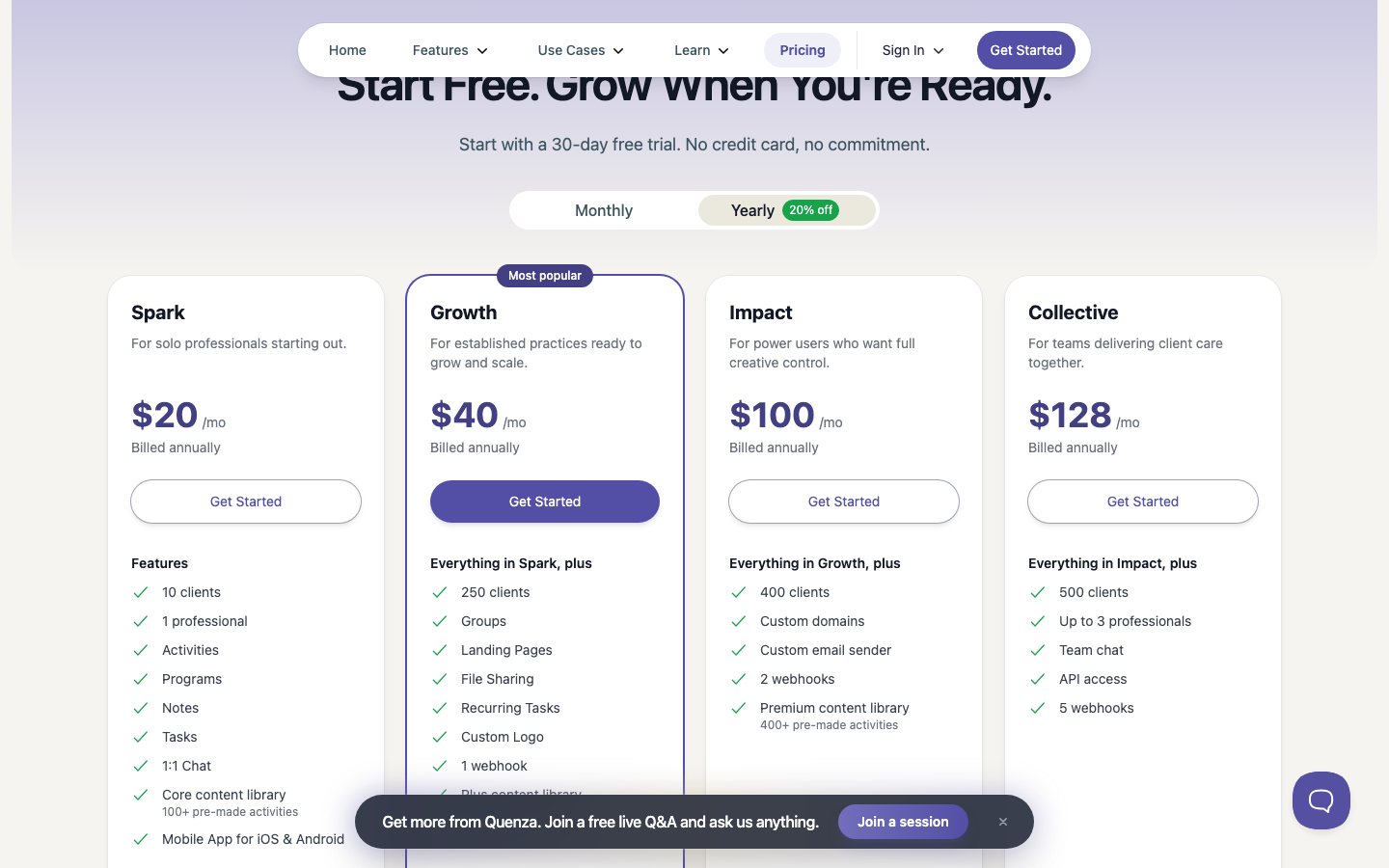
If exercises, reflections and other work between sessions are a regular part of your coaching, Quenza is an obvious one to look at. That is where the product puts much of its attention.
- Spark includes activities, programs, notes, tasks, one-to-one chat and more than 100 ready-made activities. It supports ten clients and one professional.
- The trade-off shows up when you want more around that work. Calendar integrations, groups and file sharing start on Growth at $40 a month when billed annually.
- Spark costs $20 a month with annual billing, or $25 month to month.
Best fit: coaches who regularly give clients structured work between sessions.
Check before choosing: Spark stops at ten clients, and some useful practice-management features sit on Growth.
2. HoneyBook
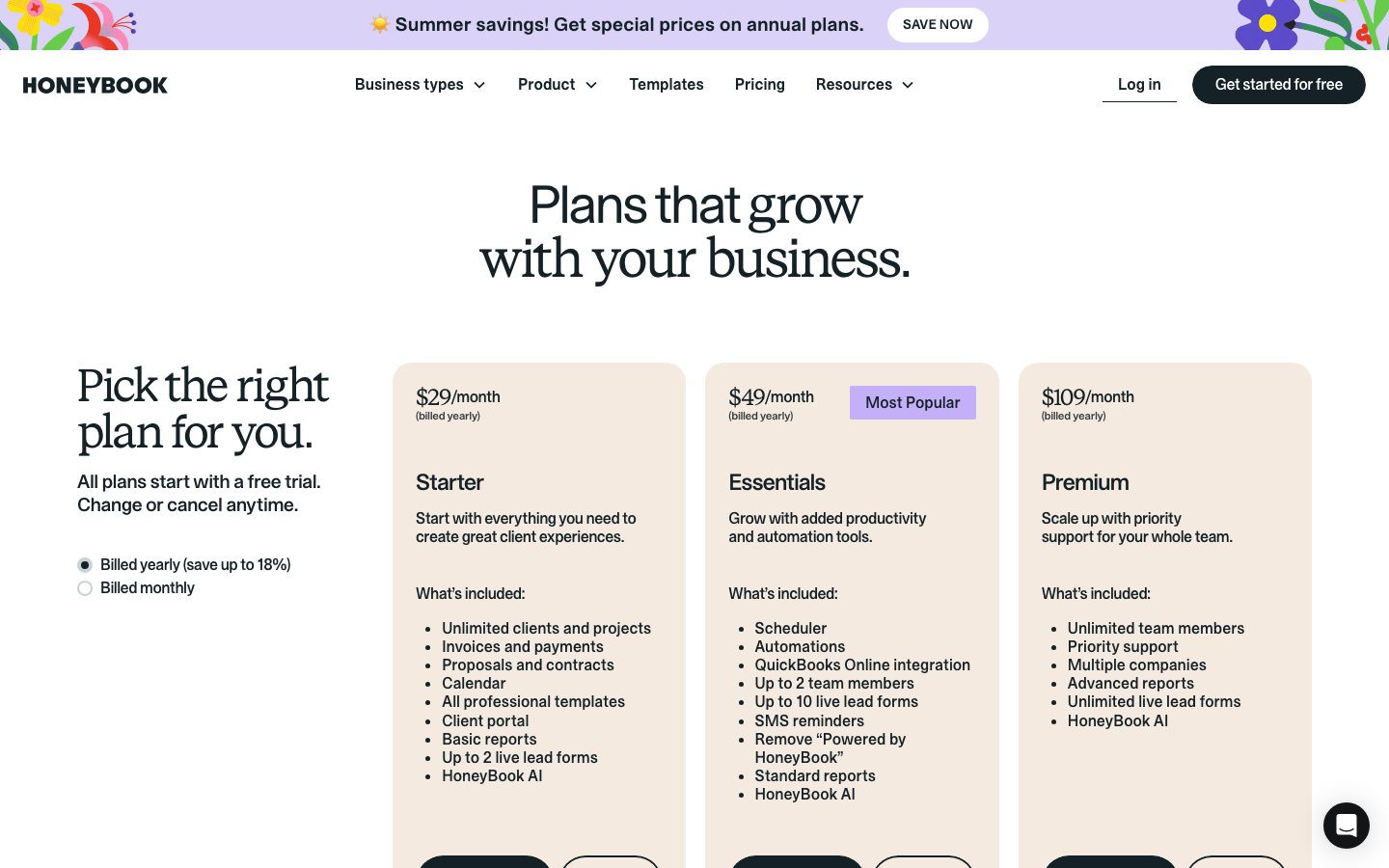
HoneyBook wasn’t built specifically for coaches, and that is useful to know before comparing its feature list with the others.
- It is designed to help service businesses move a client from inquiry to agreement to payment. Starter gives you unlimited clients and projects, contracts, invoices and payments, a calendar and client portal.
- So if the work eating into your week is sending agreements, following up on invoices and keeping client administration organized, HoneyBook may cover what you need without being coaching-specific.
- HoneyBook’s help documentation currently allows one Scheduler session type on Starter; broader scheduling functionality is part of Essentials.
- Starter is $29 a month when billed annually.
- Payment processing sits outside that subscription, and the rate varies by payment method. HoneyBook is also currently available to professionals in the U.S., Canada, UK and Australia, so location can rule it in or out quickly.
Best fit: coaches whose main pain point is running the business side of client work.
Check before choosing: goals, coaching actions, exercises and other coaching-specific workflows if those are important to you.
3. Simply.Coach
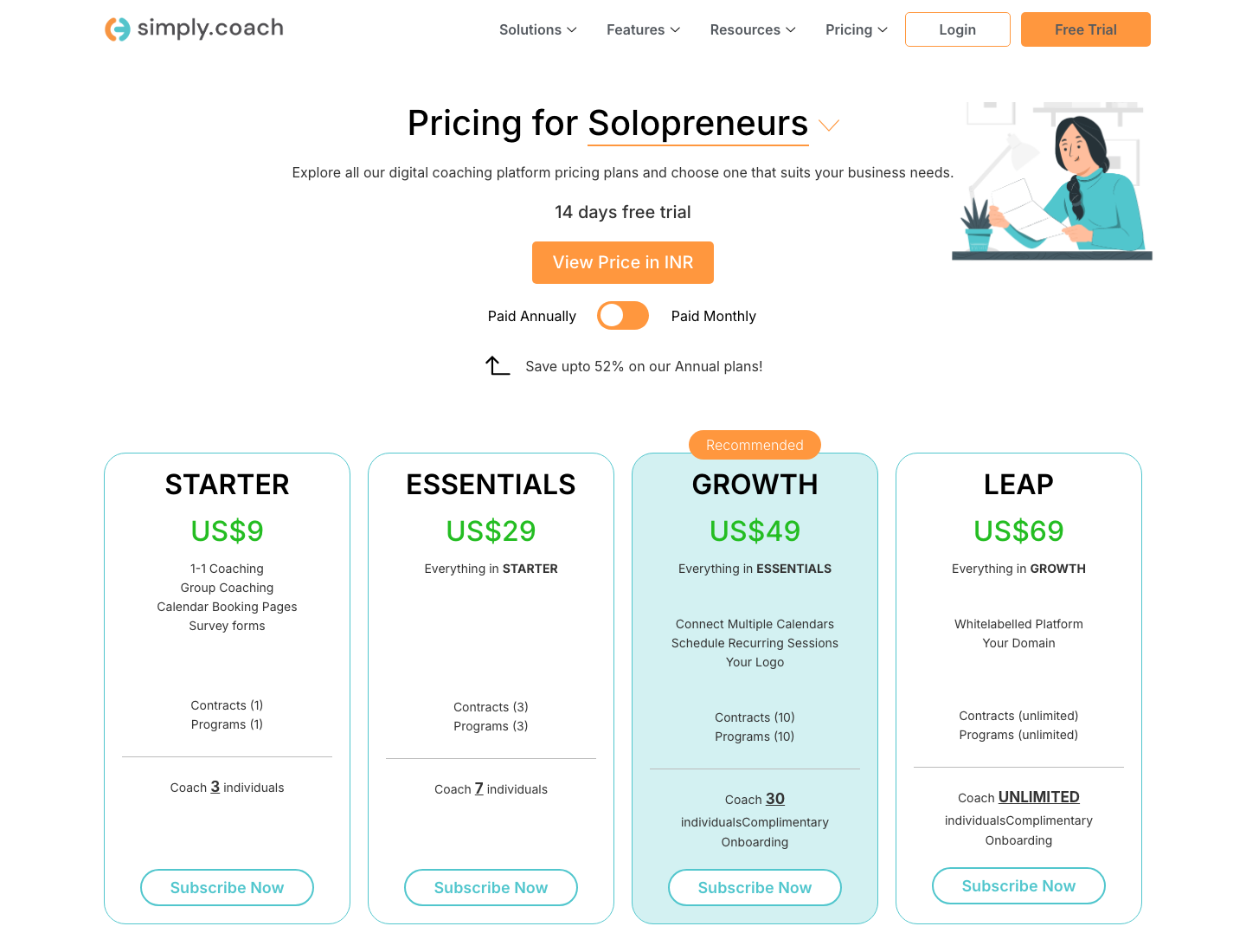
Simply.Coach is our own platform, so here’s the distinction that matters most: it starts with the coaching relationship rather than only the administration around it.
- A client’s goals, session notes, action plans, forms and progress can stay connected across the engagement, alongside the administration. Starter also includes scheduling, contracts, client portals, stakeholder management and both one-to-one and group coaching.
- That continuity becomes useful when your coaching runs over several months and you want to see more than appointments and invoices when you open a client’s record.
- Starter is $9 a month for three active clients. Essentials at $29 supports seven, Growth at $49 supports 30, and Leap at $69 removes the active-client limit.
Best fit: coaches and multi-coach businesses who want the coaching work, including goals, sessions, actions and progress, connected with practice administration.
Check before choosing: if courses and a large self-paced content library make up most of the business, compare a course-led platform too.
4. upcoach
upcoach makes more sense when the coaching has a program around it. Think cohorts, masterminds, bootcamps, structured 1:1 programs or group coaching where people are moving through a defined experience.
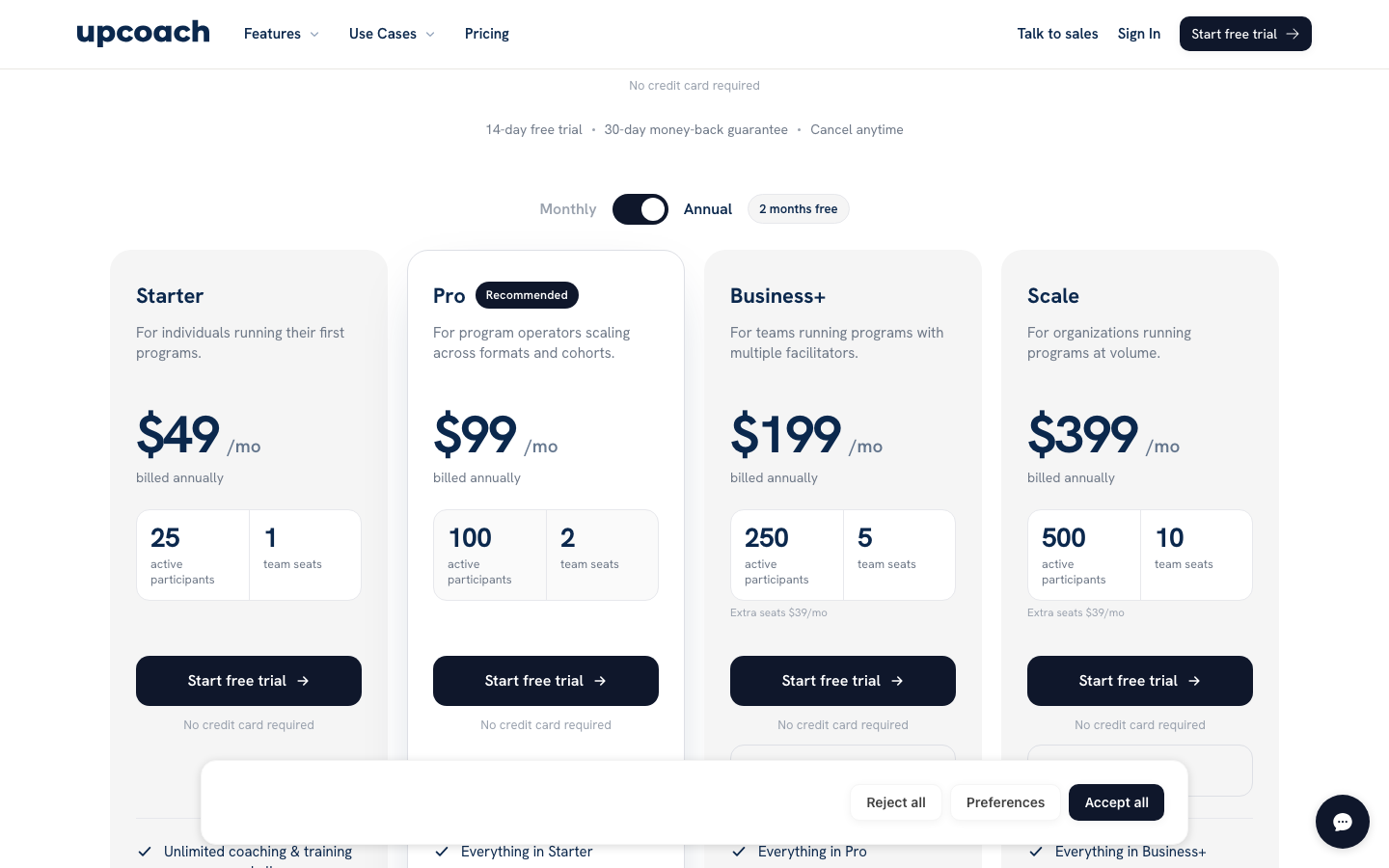
- Its core tools include worksheets, check-ins, tasks, lessons, events, community and progress tracking. Those core features are available across its plans; pricing changes mainly with active participants and team capacity.
- upcoach also supports private and 1:1 coaching formats, so it isn’t limited to cohorts or group programs.
- Starter is $49 a month when billed annually, includes 25 active participants and carries a 2% platform transaction fee on program sales.
- Participants can be deactivated when they finish, freeing capacity without removing their stored data.
Best fit: coaches who sell a structured coaching experience, whether one-to-one or to a group.
Check before choosing: how the active-participant pricing and transaction fee work with the number and price of programs you sell.
5. Simplero
Simplero is worth looking at when coaching is only one part of the business. If you also sell courses, run a membership or community, send a lot of email or sell digital products, the surrounding business is where Simplero starts to stand out.
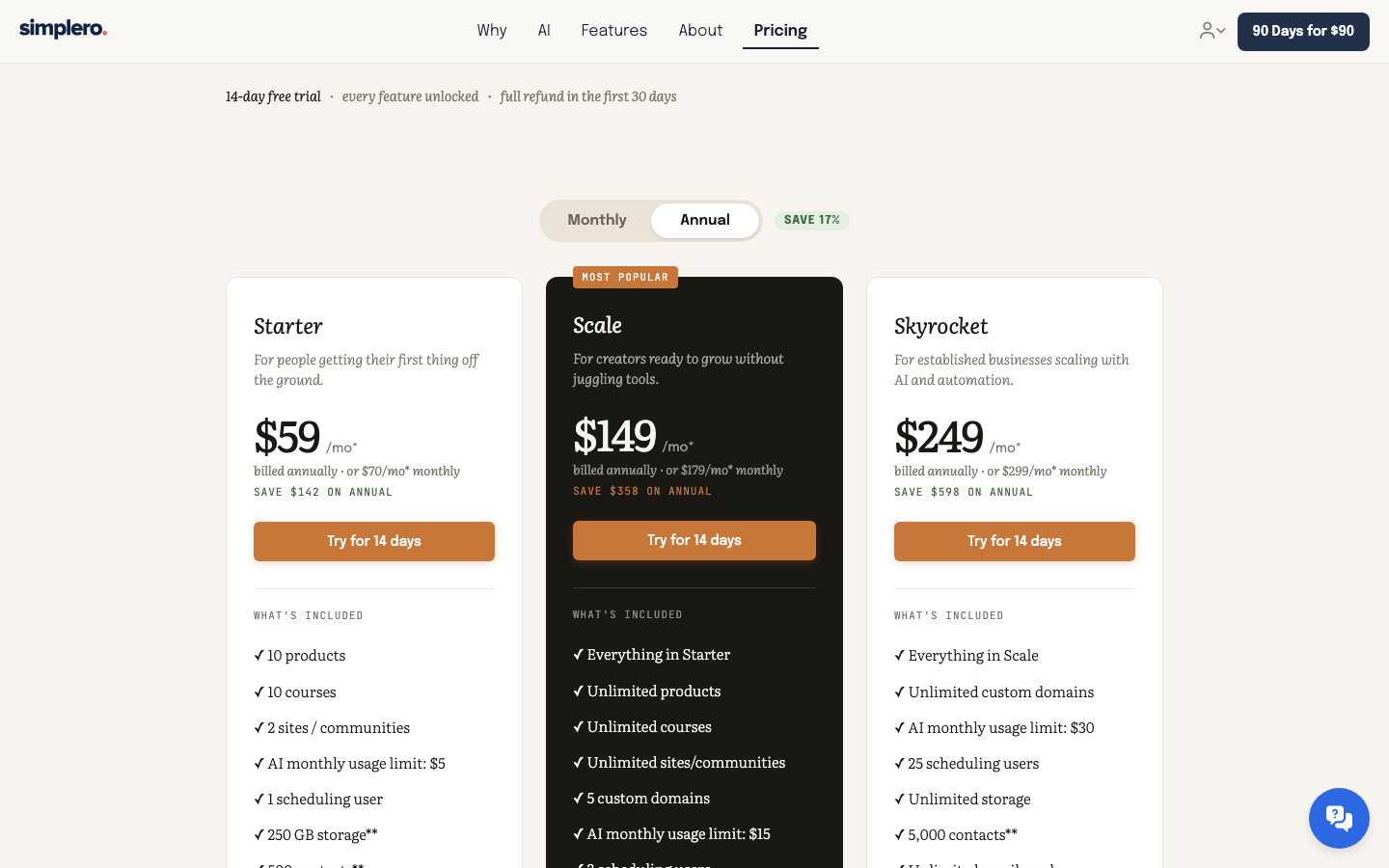
- Starter includes ten products, ten courses, two sites or communities, 500 contacts, email and 250GB of storage. Simplero publishes a 0% platform transaction fee.
- Simplero also includes coaching programs, worksheets and contracts, although some contract workflows depend on the plan.
- Starter costs $59 a month when billed annually, or $70 monthly.
Best fit: coaches whose coaching offer sits alongside courses, communities, email marketing or digital products.
Check before choosing: whether you actually need that wider digital-business toolkit if most of your revenue comes from one-to-one coaching.
What the Listed Price Leaves Out
Price is much easier to compare once you know which products actually fit your work.
A $9 entry plan and a $59 entry plan do not tell you much if the cheaper plan cannot hold your caseload, or if the more expensive one includes tools you would otherwise pay for separately.
For a simple comparison, here is the lowest published plan that can accommodate ten active clients or participants:
| Platform | Plan for 10 clients/participants | Published annual subscription |
|---|---|---|
| Quenza | Spark | $240 |
| HoneyBook | Starter | $348 |
| Simply.Coach | Growth | $588 |
| upcoach | Starter | $588 |
| Simplero | Starter | $708 |
The plans also give you different amounts and types of capacity. Quenza’s Spark plan stops at ten clients, while upcoach’s Starter plan allows 25 active participants. Simplero also includes courses, email and other digital-business tools.
Once you know which platforms fit your practice, you can compare these costs in context.
Don’t Forget the Fees Outside the Subscription
If clients will pay you through the platform, check that cost separately.
- HoneyBook charges payment-processing fees based on the payment method.
- upcoach charges a 2% platform transaction fee on Starter, falling to 1% on Pro, 0.5% on Business+ and 0% on Scale. Stripe processing is separate.
- Simplero publishes a 0% platform transaction fee.
You don’t need a complicated spreadsheet. Use the amount you realistically expect to collect over a year and see whether the fee changes the comparison enough to matter.
What to Test Before You Commit
Once you have a shortlist, use the trial to see how each platform works with your actual coaching workflow.
Run one real workflow
Set up the kind of client you work with every week.
- If you coach one-to-one, book a session, write a note and create the next action.
- If between-session work matters, assign something and see how the client receives and completes it.
- If you run a program, build a small part of the actual program rather than a fake demo.
This will quickly show you where the workflow feels easy and where it becomes awkward.
Test the thing you would hate to lose
- One coach may care most about contracts. Another may care about goals. Another needs scheduling to be effortless.
- Pick that workflow and test it properly. A platform can technically have a feature and still handle it in a way you don’t enjoy using.
Look at the next plan
- If you are already close to the client or participant limit, check the next tier now.
- Check the next tier as well, especially if you are already close to the current client or participant limit.
Look at the client’s side too
- Log in as the client if the trial allows it. See where they book, what they can read, how they find an exercise and what happens when you share something with them.
- Pay particular attention to note visibility. You should know which notes stay private and which ones a client can see before real session records start piling up.
- If notes are a major part of your workflow, our comparison of note-taking apps for coaches goes deeper into that specific job.
Check availability in your country
This takes thirty seconds and can save you an hour of comparison. HoneyBook, for example, currently supports professionals in the U.S., Canada, UK and Australia.
Conclusion
There isn’t one life coach app here that makes sense for every coaching business. That’s because these products aren’t all solving the same version of the problem.
Quenza puts the work between sessions first. HoneyBook is strong on the service-business side of the relationship. Simply.Coach follows the coaching engagement over time. upcoach gives structure to programs. Simplero connects coaching to a wider course and digital-business setup.
So don’t begin with the cheapest plan or the longest feature list. Begin with the part of your week you want the software to make easier.
Once you know that, the choice becomes much less abstract. Pick two or three platforms, run your actual workflow through them, and then look at price.
Key Takeaways
- Choose for the way you coach. A one-to-one practice, a program-led business and a course-led business need different things.
- Quenza is strongest around between-session activities; HoneyBook focuses on general client administration and payments.
- HoneyBook approaches the problem as general service-business software; Simply.Coach approaches it through the ongoing coaching engagement.
- upcoach supports structured 1:1 and group programs; Simplero connects coaching with courses and a wider digital business.
- Compare the plan your caseload actually needs, not only the advertised starting price.
- Include payment-processing or transaction fees when they apply.
- Test one real client workflow before you commit. It will show you whether the platform fits the way you actually work.
Simply.Coach is built for coaching relationships that continue from one session to the next. Goals, actions, session notes, forms, programs and stakeholder inputs can stay connected across the engagement, while administrative work gets digitized and automated. If that sounds like the way you work, see how Simply.Coach supports coaching engagements.
FAQs
1. What is the best app for life coaches?
It depends on how you coach. Quenza is strong on between-session activities, HoneyBook on general client administration, Simply.Coach on ongoing coaching management, upcoach on structured programs, and Simplero on courses and digital business.
2. Are life coaching apps secure for client data and notes?
Security varies by platform. Check its data-protection measures, privacy standards and controls over what clients can access before choosing one.
3. Can I use a life coaching app for group coaching?
Yes. Several of these platforms support group coaching, although they structure it differently. Simply.Coach and upcoach both support group formats.
4. Do clients need to pay for or install the coaching app?
Usually not. Depending on the platform, clients may use a mobile app, browser portal or program space provided through the coach’s account.
5. Can life coach apps integrate with calendars and payment tools?
Many do, but the integrations and the plans they are available on vary. Check the calendar and payment tools you already use before choosing a platform.
6. Can a coaching app help me manage more clients?
It can make the work around your clients easier to manage by keeping things such as scheduling, notes, goals, actions and payments in a clearer workflow. The benefit depends on which part of your current setup is creating the most admin.