Managing multiple clients can feel overwhelming for coaches. You have to keep track of session schedules, client exercises, progress reports, billing, and follow-ups, all while ensuring each client feels supported. Missing even a single task or deadline can disrupt your workflow and affect the quality of care you provide. For mental health practitioners and therapists, these challenges are even greater because client confidentiality and accurate progress tracking are critical.
The global coaching platform market is projected to reach $11.1 billion by 2035, from its current value of $3.8 billion, highlighting the increasing demand for tools that simplify coaching management. Coaches are now turning to online coaching portals to organize their practice, save time, and provide a better experience for clients.
In this blog, you will learn what a coaching portal is, why it matters, and the top features you should look for when selecting a platform. This article will also guide you on how to choose the right portal to help you manage your practice more efficiently and deliver stronger outcomes for your clients.
Key Takeaways
- A coaching portal simplifies client management: Track schedules, contracts, payments, resources, and progress all in one place.
- Top features matter: Look for dashboards, goal tracking, interactive learning tools, content libraries, communication systems, automated reminders, and customizable coaching plans.
- Secure and compliant: Ensure HIPAA/GDPR-compliant data protection and secure access for client confidentiality.
- Integrated workflows: Choose a portal with email integration, video conferencing, payment processing, subscriptions, and contract management.
- Personalized coaching experience: Tailor programs and track progress to boost client engagement and long-term results.
- Choosing the right platform: Evaluate your coaching model, feature needs, scalability, user experience, and support before deciding.
- Simply.Coach as a solution: All essential coaching portal features are included in one platform, streamlining administration and improving client outcomes.
What is a Coaching Portal and Why Coaches Need It
A coaching portal is an innovative tool that streamlines the management of coaching sessions and improves the experience by providing access to a wealth of resources, tools, and, most importantly, personalized progress tracking. It empowers you and your clients, instilling the confidence to collaborate on growth and coaching development.
Why a coaching portal matters for coaches
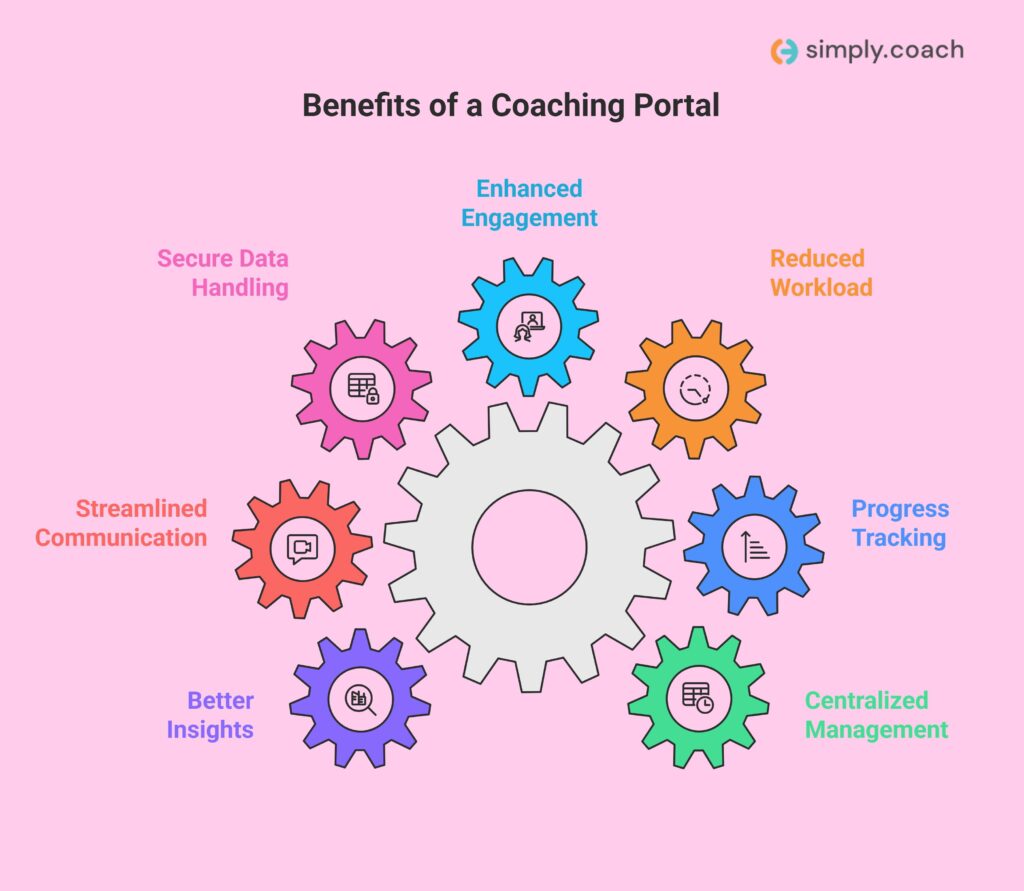
Using a coaching portal changes how you manage your practice and support your clients. It helps you stay organized, reduce manual work, and deliver consistent coaching experiences. Here are the key reasons a coaching portal matters for you as a coach:
- Centralized client management: View schedules, contracts, payments, and shared resources in one place without switching tools.
- Clear client progress tracking: Monitor goals, milestones, and session outcomes so you can adjust coaching plans when needed.
- Reduced administrative workload: Automate reminders, follow-ups, and documentation to free time for client-focused work.
- Improved client engagement: Share personalized plans, exercises, and reflections that keep clients involved between sessions.
- Secure handling of client data: Protect sensitive client information while meeting privacy and compliance requirements.
- Streamlined communication: Manage messages, resource sharing, and video sessions within a single platform.
- Better decision-making insights: Review reports and activity data to understand what is working across your coaching programs.
When these capabilities work together, a coaching portal helps you deliver structured, reliable, and meaningful coaching experiences for every client.
Also read: 20+ Best Coaching Platforms to Run and Scale Your Coaching Business
Top 12 Features Coaches Should Look For in a Coaching Portal
A coaching portal should support the way you already work while reducing manual effort and cognitive load. These features focus on operational clarity, client continuity, and measurable outcomes that matter in professional coaching and therapeutic practices.

1. Client management dashboard
Managing multiple clients across different engagement stages requires structured visibility, not scattered records. A coaching portal should centralize every client interaction so you can prepare for sessions quickly and maintain therapeutic continuity. Without a strong dashboard, critical context often gets lost between sessions.
- Unified client profile: The system should store goals, session notes, assessments, shared resources, and agreements in one accessible location.
- Session history visibility: You should be able to review past sessions, outcomes, and unresolved actions before every meeting.
- Engagement status tracking: The portal should clearly show whether a client is active, paused, or completed to support workload planning.
- Caseload overview: A multi-client view should help you monitor capacity and prevent missed follow-ups.
2. Scheduling and calendar integration
Scheduling inefficiencies directly affect your availability, revenue, and client satisfaction. A coaching portal should remove back-and-forth communication while respecting time zones and session rules. Manual scheduling often leads to errors that disrupt professional boundaries.
- Automated booking: Clients should schedule sessions based on your real-time availability and predefined constraints.
- Time zone handling: Session times should adjust automatically based on the client’s location to prevent confusion.
- Calendar synchronization: Your sessions should sync with personal and professional calendars without duplicate entries.
- Policy enforcement: Cancellation and rescheduling rules should apply consistently across all bookings.
Also read: Top 10 Appointment Scheduling Softwares for Coaches
3. Goal tracking and progress reports
Clear goal tracking allows both you and your clients to evaluate progress objectively over time. A coaching portal should connect goals directly to sessions and actions, not treat them as static notes. This clarity supports accountability and informed decisions.
- Structured goal setting: The platform should allow measurable goals aligned with coaching objectives.
- Progress indicators: Completion status should reflect real actions tied to sessions and assignments.
- Session-goal linkage: Session notes should connect directly to active goals for contextual relevance.
- Report accessibility: Progress summaries should be easy to review and share during evaluations or renewals.
4. Interactive learning tools
Client growth often happens between sessions, not during them. A coaching portal should support structured learning aligned with your methodology and session outcomes. Passive homework without tracking limits effectiveness.
- Action plan assignments: You should assign tasks that reinforce session insights and behavioral change.
- Self-reflection prompts: Clients should submit reflections before sessions to guide focused discussions.
- Skill-based exercises: Activities should support applied learning rather than generic content consumption.
- Completion visibility: You should see which activities clients complete, delay, or avoid consistently.
5. Resource and content library
Disorganized resources increase preparation time and reduce consistency across clients. A coaching portal should function as a controlled knowledge hub tailored to your programs. This ensures timely and relevant access.
- Centralized storage: Worksheets, videos, templates, and documents should live in one organized library.
- Selective sharing: Clients should only access resources relevant to their program or stage.
- Version control: Updates to materials should reflect instantly without manual redistribution.
- Usage tracking: You should see which resources clients actively use or ignore.
6. Communication tools
Clear communication supports continuity while protecting professional boundaries. A coaching portal should replace fragmented tools like email and messaging apps. This reduces misunderstandings and data risks.
- Secure messaging: Conversations should happen inside the portal without relying on unsecured platforms.
- Contextual threads: Messages should stay connected to sessions, goals, or programs.
- Group communication: The system should support group coaching without mixing private information.
7. Automated reminders and nudges
Consistency improves outcomes, but manual follow-ups increase administrative work. A coaching portal should prompt clients automatically while allowing you to control timing and tone. Over-reminding without logic reduces engagement.
- Session reminders: Clients should receive alerts before meetings to reduce no-shows.
- Task nudges: Assigned actions should trigger reminders without manual intervention.
- Custom schedules: Reminder timing should adjust based on client engagement behavior.
- Engagement signals: The system should flag clients who regularly ignore prompts.
8. Customizable coaching plans
No two clients follow the same path, even within the same program. A coaching portal should allow adjustments without rebuilding workflows. Rigid plans limit responsiveness.
- Flexible templates: Coaching plans should adapt to individual client needs without starting from scratch.
- Session-level edits: You should modify plans during active engagements without duplication.
- Progress-based changes: Plan adjustments should respond to real performance data.
- Multi-model support: Different coaching frameworks should coexist within one system.
Also read: Coaching Session Plan Template: A Step-by-Step Guide with Free & Paid Resources for Coaches
9. Secure data management
Handling sensitive client data carries legal and ethical responsibility. A coaching portal must protect information without interrupting your work. Security should operate quietly.
- Data encryption: Client information should remain protected during storage and transmission.
- Access control: Permissions should limit who can view or edit sensitive records.
- Audit logging: Every data access or edit should be traceable.
- Compliance alignment: The platform should support HIPAA and GDPR standards.
Related: How Coaches Maintain Client Confidentiality: Essential Best Practices
10. White-labeling and branding
Your client portal reflects your professional identity. A coaching platform should present your practice, not the software provider. Branding consistency reinforces credibility.
- Visual branding: The portal should display your logo, colors, and domain.
- Branded communication: Client emails and notifications should reflect your practice identity.
- Experience consistency: Branding should remain uniform across sessions, resources, and dashboards.
- Invisible platform branding: Clients should not see third-party software branding.
11. Analytics and insights
Understanding engagement and outcomes supports better coaching decisions. A coaching portal should provide actionable data, not noise. Clear insights help refine programs.
- Engagement metrics: Attendance, task completion, and interaction patterns should be visible.
- Outcome tracking: Progress trends should be measurable across clients and programs.
- Retention signals: Data should reveal patterns linked to renewals or drop-offs.
- Performance summaries: Insights should support practice reviews and optimization.
Also read: Top 8 Data Analytics and Reporting Tools for L&D Professionals
12. Subscription plans and session packages
Structured pricing models help stabilize income and set clear expectations. A coaching portal should support flexible packages that match how you deliver services. Manual tracking often causes billing disputes.
- Session bundles: You should create packages with predefined session counts and validity periods.
- Recurring subscriptions: The system should support monthly or ongoing coaching plans.
- Usage visibility: Clients should see remaining sessions or billing cycles clearly.
- Automatic enforcement: Access should adjust automatically when packages expire.
13. Contract and prospect management
Clear agreements protect your practice and guide client expectations. A coaching portal should manage contracts and prospects without relying on separate systems. This supports ethical and professional standards.
- Digital contracts: Agreements should be signed, stored, and accessed within the platform.
- Version control: Updated contracts should not overwrite historical agreements.
- Prospect tracking: You should manage inquiries before converting them into active clients.
- Status visibility: The system should show contract stages clearly, from draft to signed.
14. Invoicing and payment management
Handling payments outside your coaching portal increases errors and administrative workload. A coaching platform should manage billing in a way that aligns with professional boundaries and financial transparency. Clear payment workflows protect both you and your clients.
- Automated invoicing: The system should generate invoices based on sessions, packages, or subscriptions.
- Payment tracking: You should see paid, pending, and overdue payments without external tools.
- Multiple payment methods: Clients should pay using secure and familiar payment options.
- Financial records: All transactions should remain accessible for accounting and reporting.
Also read: 10 Best Billing Software for Coaches: Streamline Payments & Invoicing
15. Integration capabilities
A coaching portal should connect smoothly with essential tools without duplicating data or breaking workflows. Integrations should reduce manual effort while keeping client records accurate and centralized. Poor integrations often create data gaps and reporting issues.
- Video platform connectivity: The portal should integrate with video tools so sessions launch without switching platforms.
- Email integration: Client emails should sync with profiles to preserve conversation history and session context.
- CRM or data exports: Client records should transfer cleanly for reporting or audits when needed.
- Stable data sync: Integrations should work reliably without frequent disconnects or delays.
How to Choose the Right Coaching Portal
Choosing a coaching portal is a long-term operational decision, not a short-term software purchase. The right platform should support how you coach today while adapting as your practice grows. A poor fit increases manual work, limits client outcomes, and creates avoidable friction.

- Clarify your coaching delivery model: Identify whether you run one-on-one sessions, group programs, corporate engagements, or a mix, then confirm the portal supports each structure without workarounds.
- Map features to real workflows: Review the features discussed above and check whether the platform supports them natively rather than through partial solutions or add-ons.
- Evaluate user experience carefully: Test how easily you can prepare sessions, document progress, assign actions, and review client history without switching screens.
- Review data security standards: Confirm the platform supports HIPAA-aligned security, access controls, and secure data storage appropriate for sensitive client information.
- Assess customer support quality: Look for responsive, knowledgeable support that understands coaching and mental health workflows, not just software issues.
- Check scalability options: Ensure the platform can support higher client volumes, additional programs, and more complex billing models without changing systems later.
A coaching portal that aligns with your practice structure and ethical responsibilities allows you to focus on client outcomes rather than system limitations.
Learn more: Coaching Models by Simply.Coach – Frameworks & Insights from Industry Experts
Conclusion
Choosing the right coaching portal is critical to managing clients efficiently, tracking progress, and delivering personalized coaching experiences. A platform that meets all your workflow, communication, and security needs ensures you can focus on impactful coaching rather than administrative tasks. By understanding the key features outlined above, you can select a solution that supports both your practice and your clients’ growth.
Simply.Coach: Your all-in-one coaching platform
Simply.Coach is an all-in-one coaching platform designed for professional coaches, therapists, and mental health practitioners. It centralizes client management, scheduling, communication, billing, and program tracking into a single secure platform, helping you run your practice efficiently while enhancing the client experience.
- Client management and progress tracking: Capture detailed client profiles, session notes, goals, assessments, while monitoring progress with visual dashboards and milestone tracking.
- Scheduling, automation, and reminders: Manage one-on-one, group, and corporate sessions effortlessly, with time zone adjustments, automated reminders, and calendar syncing to reduce no-shows.
- Interactive learning and resource library: Assign action plans, exercises, quizzes, and curated resources to engage clients between sessions and reinforce outcomes.
- Customizable coaching plans and branding: Tailor coaching programs to each client’s needs and maintain your professional identity with white-labeling and consistent branding.
- Payments, subscriptions, and contracts: Handle invoicing, session packages, recurring subscriptions, and client agreements directly within the platform.
- Integrated communication and tools: Conduct secure video sessions, manage messaging, sync emails, and integrate with CRMs and other platforms for seamless workflows.
Simply.Coach consolidates all essential coaching tools in one platform, allowing you to focus on delivering impactful sessions, growing your practice, and providing a consistent, professional experience to your clients.
FAQs
1. Can a coaching portal replace separate tools like email, calendar, and notes?
Yes. A coaching portal like Simply.Coach or CoachAccountable centralizes communication, calendar sync, session notes, and task tracking, reducing the need for separate email, calendar, and note apps.
2. How long does it take to set up a coaching portal for my practice?
Most portals let you set up basic scheduling, client profiles, and intake forms in a few hours, while full customization with branding and workflows may take one to a few days.
3. Are coaching portals secure enough for sensitive client information?
Yes. Reputable coaching portals like Simply.Coach invest in encryption, access controls, and compliance with privacy standards like HIPAA or GDPR to protect client data.
4. Do coaching portals integrate with tools like Zoom and Google Calendar?
Yes. Most modern coaching portals, including Simply.Coach, Delenta and Quenza, integrate with Zoom for video sessions and Google Calendar for scheduling to keep workflows connected.
5. What types of coaching formats can a coaching portal support?
Coaching portals typically support one-on-one, group, and program-based coaching formats, and many allow hybrid models with cohort or corporate coaching features.
6. Can a coaching portal replace client relationship management (CRM) software?
Partially. Some portals like Simply.Coach include CRM-like features (notes, reminders, progress tracking), but larger CRM tools may still be needed for advanced marketing or lead pipelines.