
Will automation take the human side out of coaching, or give coaches more room for it? For most practices, it is the second. Automation for coaching business owners means letting software run the steps that repeat, such as follow-up emails, contracts, invoices, onboarding and reminders, so more of your week goes to clients.
That shift is speeding up, and the reasons are practical. Below you will find what other industries suggest about where coaching is heading, the forces pushing automation into everyday practice, the places it helps most, what it should never replace and how to tell whether your practice is ready. If you only have a few minutes, start with the signs that your business is ready.
TL;DR
Automation is becoming a standard part of running a coaching business because coaches expect growth to come from more clients and more sessions rather than higher fees, and manual admin grows with every new client. Software can now handle lead follow-up, contracts and invoices, onboarding, check-ins between sessions and the extra volume that comes with growth. Few coaches have invested in it yet, which leaves room for those who set it up early. The human parts of coaching, such as building trust, asking the right question and noticing what a client leaves unsaid, stay with the coach. Automate the steps that run the same way every time, beginning with the one that costs you the most hours, and keep your attention for the conversation.
What Other Industries Teach Coaching About Automation
Many industries started as a craft, moved to specialists, then to machines and finally to software-run processes. Clothing is a clear example, moving from home production to tailors and guilds, then to factories in the Industrial Revolution and, more recently, to digital and automated production. At each step the skilled work stayed with people while the repetitive steps moved to machines.
Coaching is younger and is still professionalizing, with professional bodies, training programs and research growing over the past few decades. Its repetitive work, such as scheduling, contracts, invoices and follow-up, is where the same pattern is starting to show. The coaching itself remains the skilled part, and that is where automation leaves you more time.
Why Automation Is Becoming the Next Big Thing in Coaching
Three forces are moving automation from optional to expected: how coaches plan to grow, how coaching is now delivered and how few coaches have invested so far.
1. Coaches plan to grow by volume
The 2025 ICF Global Coaching Study, based on 10,035 valid responses, found that coaches expect revenue growth to come mainly from more clients (60%) and more coaching sessions (51%), while only 37% expect higher hourly fees. Growth by volume means more bookings, contracts, invoices and follow-ups for every hour of coaching.
2. Coaching has moved onto platforms
Delivery has already moved online. The same study found that coaches who use digital coaching platforms rely on them mainly for one-on-one virtual sessions (35%) and for scheduling and client management (23%), and 54% say better platforms and technology are a priority to meet the demands of future clients. Those platforms sit inside the wider set of software for coaches that most practices now rely on, and the admin around sessions is the next part of that set to run on its own.
3. Few coaches have invested so far
Investment still lags behind intent. Only 19% of coaches invested in new technology in the past year, a share expected to reach 27% over the next one to three years, and 37% call adapting to technology and digital tools a major concern.
That gap is the opportunity, because coaches who automate the repetitive work now can take on more clients without the admin growing at the same rate.

Where Automation Helps a Coaching Business Most
Automation earns its keep wherever a task starts with a predictable trigger and follows the same steps each time. These five areas cover most of the admin in a coaching practice, and each one can be handled by automation tools for coaches or by one coaching platform.
| Area | What can run on its own | What stays with you |
|---|---|---|
| Lead capture and nurturing | Delivering the free resource and a series of follow-up emails | Writing the resource and the emails in your voice |
| Contracts and invoices | Sending the proposal, contract and invoice in order, and tracking payment | Agreeing the scope and fee with the client |
| Client onboarding | Welcome messages, schedules and requests for intake information | The first conversation and setting expectations together |
| Between sessions | Goal reminders, session invites and collecting worksheet responses | Deciding what each client needs next |
| Growth | Handling more prospects and clients without extra admin | Choosing which clients and programs to take on |
Automation also brings consistency. Google’s site reliability engineers, who automate at very large scale, point out that one of the main values of automation is consistency in how work gets done, and for a coach that means every client gets the same reminders, forms and follow-up.
1. Lead capture and nurturing
New prospects keep a coaching business growing, and much of the work of staying in touch with them can run on its own. A lead magnet, such as a free guide or template, trades something useful for an email address. An automated series of emails can then share your approach and your results over a few weeks, so a prospect who is not ready today still hears from you when they are.
Email marketing platforms such as Mailchimp, ActiveCampaign, MailerLite and Kit (formerly ConvertKit) can send these sequences. Your expertise goes into the free resource and the emails, and the sending takes care of itself.
2. Contracts and invoices
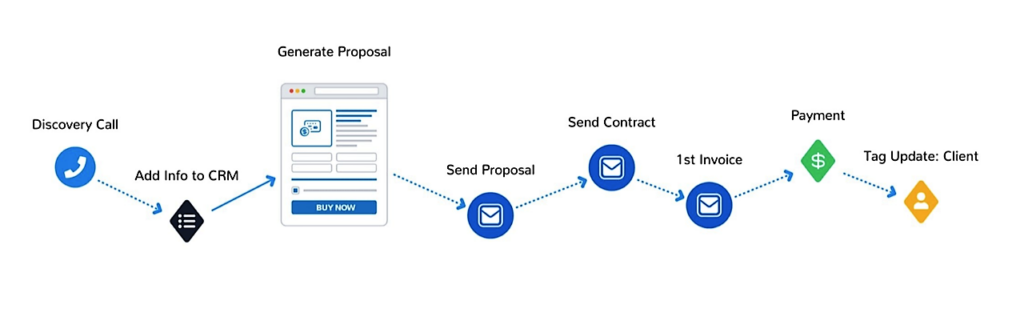
Most coaches follow the same steps when a prospect becomes a client: a proposal, a contract, a first invoice and a payment. Done by hand, each step means preparing a document, sending it and checking whether it came back.
Automation tracks each stage and sends the next document as soon as the previous one is complete. The flow below shows a typical sequence from discovery call to paying client.
3. Client onboarding
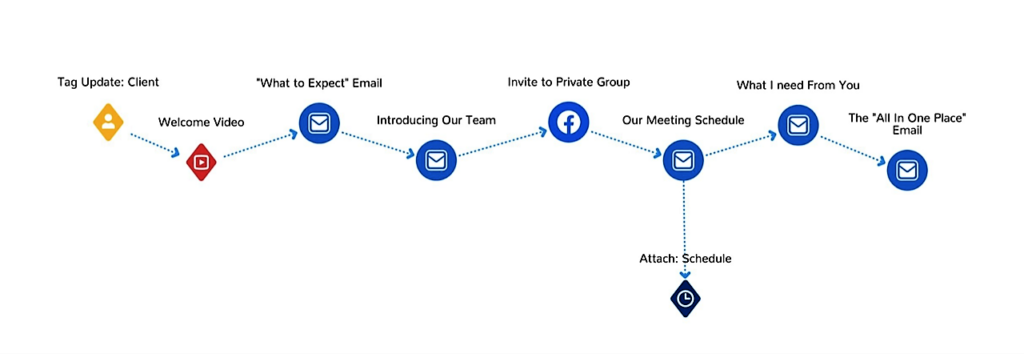
Onboarding sets the tone for the whole engagement, so it pays to get it right every time. A good onboarding sequence tells the client what to expect, introduces the people involved, shares the meeting schedule and asks for what you need before the first session. Our client onboarding checklist lists the pieces most coaches include.
Once the sequence exists, automation sends each piece at the right moment, starting when the client is tagged as a client. That is coaching workflow automation in practice, and it keeps your onboarding consistent even in your busiest weeks.
4. Client management between sessions
Much of the work between sessions follows a pattern too. A coaching platform can track goals, send nudges and session invites with meeting links, share coaching tools and worksheets on a schedule, and collect the client’s responses in one place.
The coach still decides what each client needs. Automation makes sure the agreed steps actually happen, so momentum does not depend on you remembering to send a reminder.
5. Scaling without trading more time
Automation matters most when you grow. If every new client adds the same amount of admin, growth stalls at the point where your week is full. With the repeatable steps automated, more prospects and clients add little extra work, and your time goes to sessions.
The tools you choose decide how far this goes. A shortlist of coaching automation software compares how the main options handle these five areas, so you can match one to the way your practice works.
What Automation Should Never Replace
Automation handles steps that repeat the same way every time, and coaching itself does not work like that. Clients come to you for judgment, presence and a relationship, and none of those run on a trigger.
- Building trust: A client opens up because of how you listen, not because a welcome email arrived on time.
- Asking the right question: The question that shifts a client’s thinking comes from what you hear in the session.
- Reading what goes unsaid: A pause, a change of tone or a topic the client avoids is information no workflow can collect.
- Changing the plan: When a client’s situation changes, you decide what happens next, and the automated steps follow your decision.
- Personal follow-up: A note after a breakthrough means more in your own words than in a template.
The same applies to newer tools. AI in coaching can draft summaries and answer routine questions, but a 2022 comparison of AI and human coaches still found that AI lacks the empathy and emotional intelligence a human coach brings.
How to Tell Your Coaching Business Is Ready for Automation
You do not need a large practice to benefit from automation, and a few everyday signs show when manual admin has started to cost you clients or time.
- You send the same email, by hand, more than twice a week.
- Invoices go out late, or you chase payments you forgot to request.
- New clients wait days for their contract, intake form or first session link.
- Follow-ups between sessions slip when your week gets busy.
- You turn down new clients because admin, not coaching, fills your calendar.
- You are adding a second coach and need everyone to work the same way.
If two or more of these sound familiar, start with the task that costs you the most hours and automate that one first. A step-by-step plan to automate your coaching business sets out the order most coaches follow, from booking and payments to onboarding and check-ins.
Conclusion
Automation is becoming the next big thing in coaching for a simple reason. Coaches plan to grow by working with more clients, and admin done by hand grows with every one of them. Automating the steps that repeat, from lead follow-up to contracts, invoices, onboarding and check-ins, is how a practice grows without filling the coach’s week with paperwork.
The coaching itself stays human. Simply.Coach is built for that split, automating the admin and program delivery around sessions so coaches can give their full attention to clients.
Key Takeaways
- Growth means volume. Most coaches expect more revenue from more clients and sessions, and each one brings its own admin.
- Automate on triggers. Any task that starts with a predictable event, like a signed contract, is a candidate.
- Start with your biggest drain. Pick the one task that costs you the most hours each week and automate it first.
- Keep onboarding consistent. A set sequence makes every new client feel expected, even in a busy week.
- Protect the human work. Trust, questions and judgment in the session never run on a workflow.
- Move early. Few coaches have invested in new technology yet, so automating the repetitive work now sets your practice apart from most of your peers.
If your week still goes on sending onboarding emails, chasing contracts and remembering check-ins, those steps can run on their own. Simply.Coach lets you build reusable coaching programs once, then automates delivery on a set rhythm while you personalize each client’s plan.
Frequently Asked Questions (FAQs)
What is automation for a coaching business?
It means letting software run the admin steps that repeat the same way for every client, such as follow-up emails, contracts, invoices, onboarding messages, reminders and check-ins. The coach sets each sequence up once, and it runs whenever its trigger happens, such as a booking, a payment or a signed contract.
Why use automation tools in coaching?
They give back the hours spent on repetitive admin, make every client experience consistent and stop steps like reminders or invoices from slipping. They also let a practice take on more clients without the admin growing at the same rate, which matters because most coaches plan to grow by adding clients and sessions.
How to automate your coaching business?
List the tasks you repeat by hand each week, pick the one that costs you the most time and set up its trigger and steps once in a coaching platform or automation tool. Check the first few runs with real clients, then move to the next task. Most coaches start with booking, payments and onboarding.
What is the future of coaching? What trends should I watch for?
Watch three things: more coaching delivered on digital platforms, more of the admin around sessions running automatically, and AI tools that draft, summarize and answer routine questions. The 2025 ICF Global Coaching Study found 54% of coaches call better platforms and technology a priority, while only 19% invested last year.
What should a coach automate first?
Start with the task that eats the most time and follows the same steps every time. For many coaches that is scheduling with reminders, then contracts and invoices, then onboarding. Leave anything that needs your judgment, such as session planning or a personal note, for later or for you.
Will automation make my coaching feel less personal?
Not if you automate the admin rather than the relationship. Reminders, contracts and invoices running in the background give you more time and attention for sessions. Keep the moments that matter, such as a note after a breakthrough or a change to the plan, in your own words.
Can automation help a coaching business scale?
Yes. When every new client adds the same amount of admin, growth stops when your week is full. Automating the repeatable steps means more prospects and clients add little extra work, so you can grow the number of clients and sessions without adding the same number of admin hours.
What is automated coaching?
The term is used two ways. It can mean automating the business around coaching, such as booking, payments and onboarding, or coaching delivered by software, such as AI chatbot coaches. Most coaching businesses use the first to free their time and keep the coaching itself human.