A new client is ready to start on Monday, but the signed agreement is buried in an email thread and the NDA never came back. Contract management software prevents that. It lets you create, send, sign, track and store coaching agreements in one place, with reminders before anything lapses.
Below you will find why coaches use these tools, the features that matter for a coaching practice, a side-by-side comparison and a closer look at each option, from coaching platforms with contracts built in to enterprise contract systems. The last section helps you match a tool to your contract volume, budget and integrations. If you already know what you need, go straight to the comparison table.
TL;DR
Contract management software keeps coaching agreements, NDAs and payment terms in one place, with templates, e-signatures, reminders and searchable storage. For most solo coaches and small practices, a tool that combines contracts with proposals, scheduling or client management covers the need, such as PandaDoc for proposals and documents, HoneyBook for proposals with payments, or Simply.Coach for contracts inside a coaching platform. Concord and ContractWorks suit a higher contract volume, while DocuSign CLM, Ironclad, Juro, LinkSquares and Evisort are built for larger teams with complex approvals and quote-based pricing. Pick by contract volume, by whether you need signatures only or full contract management, and by budget, integrations and room to grow.
Why Coaches Need Contract Management Software
Missing a single deadline or misplacing a signed contract can delay sessions, create confusion and even cost you revenue. Contract management software keeps every agreement organized, automates routine steps and shows you exactly what each client has committed to.
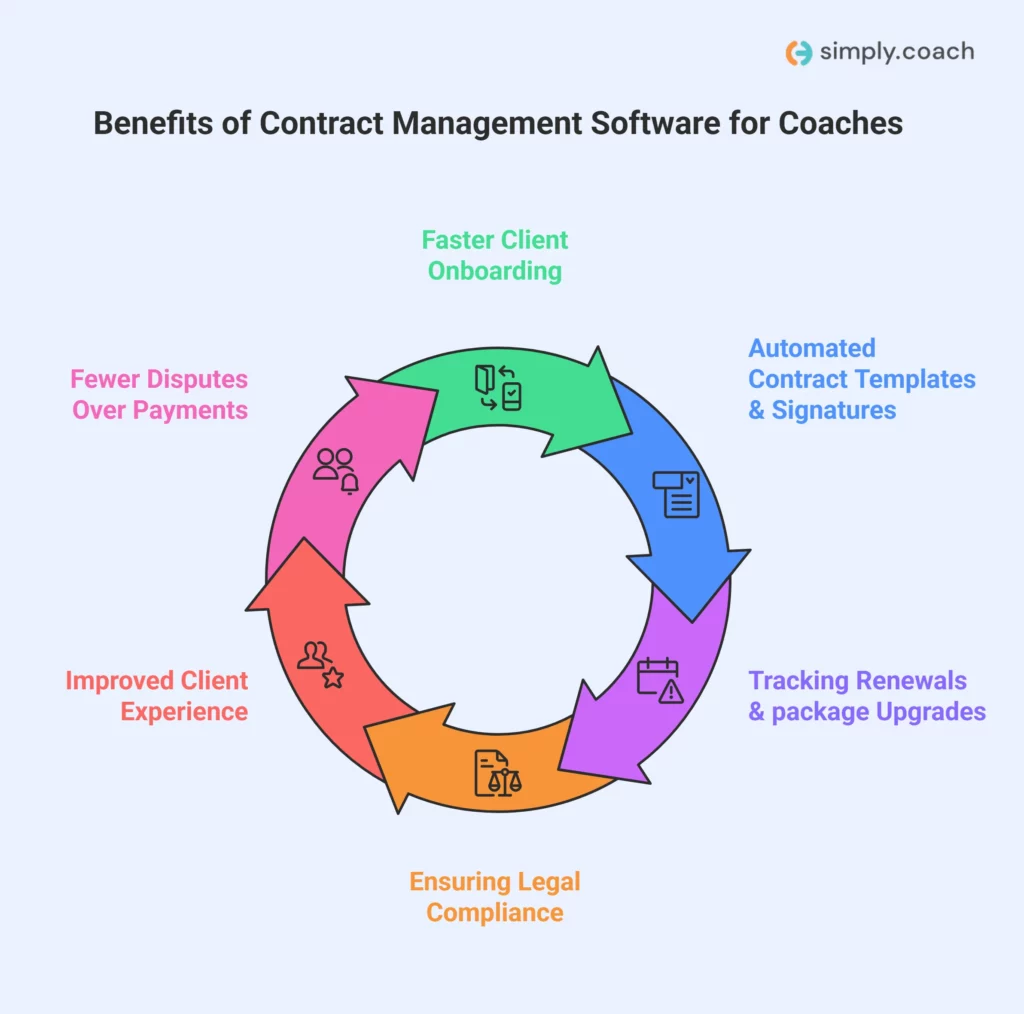
These are the benefits that matter most for a coaching practice.
- Faster client onboarding: You can send coaching agreements and NDAs straight away, so clients start sessions without delays. Manual paperwork often causes confusion and slows down client onboarding.
- Automated contract templates and signatures: Reuse ready-made coaching templates for one-on-one or group coaching. Digital signatures cut out back-and-forth emails and help contracts get completed correctly the first time.
- Tracking renewals and package upgrades: The software alerts you when packages expire or sessions need renewing. That prevents missed payments and gives you a natural moment to offer an upgrade.
- Ensuring legal compliance: Built-in templates and records help you keep NDAs, liability waivers and coaching agreements accurate and up to date. That lowers the risk of disputes or legal issues.
- Improved client experience: Clients can review, sign and store agreements online. Clear deadlines and payment terms build trust and reduce misunderstandings.
- Fewer disputes over payments or services: Automatic reminders and well-organized agreements make sure you and your clients understand session commitments, timelines and deliverables.
Contract management software takes this admin off your desk, so your attention goes to clients. The tool only helps if the agreement itself is sound, so check yours against a coaching contract checklist before you turn it into a template.

What to Look for in Contract Management Software
The right contract management software makes a real difference to how quickly you can bring on clients and how reliably you get paid. These are the features coaches should look for first. Integrations matter more than they look, because the 2025 ICF Global Coaching Study found that coaches who use digital coaching platforms rely on them mainly for virtual sessions and for scheduling and client management.

- Easy contract creation and coach-specific templates: Look for software with ready-made coaching templates, including NDAs, session agreements and program packages. That saves you drafting the same contract again and keeps every agreement in line with how you coach.
- E-signature support: Clients should be able to sign agreements remotely. Digital signatures avoid the delays of printing, scanning or mailing contracts, so clients can start sessions right away. In the US, the ESIGN Act says a contract may not be denied legal effect just because an electronic signature was used.
- Automated reminders: Choose a platform that alerts you and your clients about upcoming renewals, session packages or missed payments. That prevents lost revenue and saves you tracking deadlines by hand.
- Centralized repository: All contracts, NDAs and payment records should sit in one secure place. One central system makes it easy to find past agreements, check client commitments and avoid misplaced documents.
- CRM and calendar integrations: Connecting your calendar and CRM links each contract to the right client profile. You can schedule sessions, track milestones and manage communication without switching between tools.
- Mobile access: Opt for software that works on a phone or tablet. Coaches often work with clients virtually or on the go, and mobile access lets you review or send an agreement at any time.
A tool with these features keeps your contracting simple, reduces errors and gives clients a professional, reliable process from the first agreement to the last renewal.
How We Chose These Tools
Each tool is on this list because it handles a real part of contracting for coaches, from the first agreement to renewal and storage.
- What we compared: 10 tools that manage contracts, from coaching platforms with contracts built in to dedicated contract lifecycle management (CLM) systems for larger teams.
- How we chose them: each had to create or store client agreements, support e-signatures and send reminders or alerts, and be on sale today.
- Where the details come from: each vendor’s own website and pricing page. Where a pricing page could not be read, no price is quoted.
- What we left out: signature-only apps with no storage or reminders, and legal practice software built for law firms.
- Limits of the list: we have not run every tool with clients, so treat each entry as a shortlist to trial rather than an endorsement.
Best Contract Management Software for Coaches in 2026
Managing contracts by hand can slow your practice down, cause missed renewals and create confusion around client agreements. The right software keeps contracts organized, gets signatures back on time and reduces admin errors, so your sessions go ahead without interruptions.
Before looking at each tool in detail, here is a side-by-side view of what each one does best and how it is priced. Prices were checked on each vendor’s pricing page on October 13, 2026.
| Software name | Strongest at | Pricing |
|---|---|---|
| PandaDoc | Contract and document creation with e-signatures | Not quoted; the pricing page could not be read |
| Concord | Unlimited documents and collaborative editing | From $499 a month, paid annually, for 5 users (Essentials) |
| ContractWorks | Simple contract storage and reminders | Not listed on its website |
| HoneyBook | Combined CRM, contracts, scheduling and payments | From $29 a month, billed yearly (Starter) |
| Simply.Coach | Contracts, scheduling and client progress in one coaching platform | From US$9 a month, billed annually (Starter) |
| DocuSign CLM | Contract workflow and automation for larger teams | Not listed on its CLM page |
| Ironclad | Custom workflow automation for larger practices | Not listed on its website |
| Juro | Browser-based contract workflow and editing | Not listed on its pricing page |
| LinkSquares | Post-signature analytics and contract insights | Not listed on its pricing page |
| Evisort | Contract data extraction with AI, now part of Workday | Not listed on its website |
1. PandaDoc

Best for: Coaches who need a reliable way to create, send, sign and track coaching contracts, proposals and agreements in one workflow. PandaDoc works well when you manage several client documents and want to see when each agreement is viewed, signed or still pending.
Not for: Coaches who want scheduling, goals and session notes in the same tool, since PandaDoc is built for documents rather than coaching work.
Key features: PandaDoc covers the full document cycle, from the first draft to payment.
- Contract and document creation: Create coaching agreements from editable templates, so drafting each new contract takes less time.
- Legally binding e-signatures: Clients sign agreements online from any device, and you get status updates as they happen.
- Document tracking: You see when a client opens, reviews or completes a contract, which saves follow-up emails.
- Integrations with CRM tools: Client data syncs from connected systems, which cuts manual entry across documents.
- Payment support: Contracts can include pricing tables and payment collection within the same signing flow.
Pricing: PandaDoc’s pricing page refused automated checks on October 13, 2026, so no figure is quoted here. Check its current plans before you commit.
| Pros | Cons |
|---|---|
| Easy-to-use editor for contracts and coaching documents | Costs rise as you add users |
| Built-in e-signatures remove the need for extra tools | Advanced automation requires higher plans |
| Real-time document tracking improves follow-ups | Not built specifically for coaching work |
| Supports payments within signed agreements |
2. Concord

Best for: Coaches or coaching teams that manage a high volume of contracts and need strong collaboration, negotiation and central storage. Concord suits practices where several people review or sign agreements and deadlines need close tracking.
Not for: Solo coaches with a handful of clients, given the $499 monthly entry price and annual billing.
Key features: Concord is built for volume and collaboration.
- Unlimited contracts and e-signatures: You can send and sign as many agreements as you need without signature limits.
- Live contract collaboration: Contracts can be edited, commented on and negotiated directly inside the platform.
- Automated deadline tracking: Renewal and expiry reminders help you stay on top of client agreements.
- Contract data extraction: Key terms and dates are captured automatically, which cuts manual tracking.
- Approval workflows: Set approval paths keep contracts moving through review stages without delays.
Pricing: Concord’s Essentials plan costs $499 a month, paid annually, for five users, with extra users at $49 a month. The Business plan is $899 a month and Enterprise is $1,299 a month, both paid annually for five users.
| Pros | Cons |
|---|---|
| Unlimited documents and e-signatures included | High entry price for solo coaches |
| Strong collaboration and negotiation tools | Annual billing is required |
| Automated reminders reduce missed renewals | Coaching-specific features require setup |
| Central contract storage improves visibility | Advanced features only in higher plans |
3. ContractWorks

Best for: Coaches who need a dependable system to store, track and manage signed agreements, reminders and contract drafts in a secure, searchable repository. ContractWorks, now part of Onit’s product portfolio, keeps your coaching contracts in one place with alerts, so nothing slips through the cracks.
Not for: Coaches who want to see prices before talking to sales, or who need coaching features alongside contract storage.
Key features: ContractWorks focuses on storage, search and alerts.
- Central contract repository: Store all your coaching agreements in one secure cloud location you can reach from anywhere.
- Automated alerts: Set reminders for contract renewals, payment milestones and expiry dates, so important dates do not slip.
- Smart tagging and OCR search: Tag key data points and use optical character recognition (OCR) to find the right contract or clause quickly.
- Built-in e-signatures: Send contracts for signature and file signed documents automatically without a third tool.
- Custom reporting: Generate reports that give you an overview of contracts, deadlines and key obligations.
Pricing: ContractWorks does not list prices on its website, so you need to request a quote.
| Pros | Cons |
|---|---|
| Built-in e-signatures included | No public pricing makes budgeting harder |
| Automated alerts and reminders reduce missed obligations | Not tailored to coaching work (general contract focus) |
| Smart tagging and OCR search save time on retrieval | May offer more than a solo coach needs |
| Central repository improves contract visibility |
4. HoneyBook

Best for: Coaches looking for one service that combines client management, scheduling, proposals and contracts with payment processing. HoneyBook brings contract templates together with CRM and project tracking, so you can manage each coaching engagement from one place.
Not for: Coaches who need advanced contract reporting, or who want to avoid payment processing fees on transactions.
Key features: HoneyBook ties contracts to the rest of the client relationship.
- Proposals with contracts: Create proposals that include coaching contracts, pricing and payment terms in one document.
- Contract templates: Use reusable contract templates and adjust them for different coaching packages.
- Online signatures: Clients sign contracts directly in the platform, and you can track their status easily.
- Client portal: Give clients one place to view contracts, invoices and project details.
- Scheduling and automation: Book sessions, automate reminders and connect calendars to keep coaching appointments on track.
Pricing: HoneyBook’s plans are $29 a month for Starter, $49 a month for Essentials and $109 a month for Premium, all billed yearly. A full breakdown of HoneyBook pricing covers what each plan adds and the payment processing fees.
| Pros | Cons |
|---|---|
| Combines contracts, CRM and payments in one dashboard | Pricing can feel high for solo coaches just starting out |
| Client portal makes agreements clear to clients | Contract reporting is less advanced than dedicated CLM tools |
| Scheduling and invoices alongside contracts mean less tool switching | Some automation features are limited to higher plans |
| Payment processing fees apply on transactions |
5. Simply.Coach
Best for: Coaches who want client contracts, session scheduling and progress tracking in a single platform instead of several separate tools. Simply.Coach is the platform we build, so it is the one we know best, and it is held here to the same criteria as every other tool on the list.
Not for: Teams that need multi-step legal approvals and redlining across departments, which a full CLM system handles better.
Key features: Contracts sit alongside the rest of the coaching work.
- Contract handling and e-signatures: Create contracts from ready templates, including templates that follow ICF guidance, then share them for digital signature and keep each one with the client’s details.
- Session scheduling and client reminders: Sync with calendars, let clients book themselves and send automated reminders to reduce no-shows.
- Integrated client portal: Clients see their goals and actions, track their progress, keep notes and share work with you in their own workspace.
- Goal setting and progress tracking: Define client goals and track progress step by step to show measurable outcomes.
- Reusable templates: Save contract and program templates so you do not repeat the setup for each new client.
Pricing: There is a 14-day free trial with no credit card required. Paid plans start at US$9 a month for Starter and go up to US$69 a month for Leap, which adds a white-labelled platform, with both prices billed annually.
| Pros | Cons |
|---|---|
| Combines contracts, scheduling and coaching tools in one platform | The range of features takes some time to learn |
| Built-in reminders reduce missed sessions and payments | Lower plans cap the number of contracts and programs |
| Integrated client portal improves engagement and clarity | Not a full CLM system for complex legal approvals |
6. DocuSign CLM

Best for: Coaches working with complex or high-volume contracts who want strong automation, custom workflows and deep integrations. DocuSign CLM helps you generate, route and manage contracts centrally with built-in controls and analytics.
Not for: Solo coaches with simple agreements, since setup can take training and pricing needs a sales conversation.
Key features: DocuSign CLM is built around automated contract routing.
- Dynamic contract creation: Use templates and data to generate agreements automatically, which cuts manual drafting.
- Workflow automation: Build automated routing for review, approval and signature with drag-and-drop tools.
- Central repository: Store all agreements in one searchable place with access control and metadata tagging.
- AI insights: Analyze clauses, extract key terms and spot risks earlier to shorten contract cycles.
- Integration flexibility: Connect CRM and collaboration apps so contract data flows between systems.
Pricing: DocuSign’s CLM page does not list a price and points buyers to its sales team. The lower per-user prices on DocuSign’s general pricing page belong to its eSignature plans, not CLM, and that page redirected to a regional version on October 13, 2026, so no figure is quoted here.
| Pros | Cons |
|---|---|
| Strong automation and workflow capabilities | Quote-based pricing can be expensive for small practices |
| Contract analytics and AI insights | Setup may need training or implementation effort |
| Central contract repository with permissions | Not built specifically for coaching work |
| Workflow automation speeds up contract execution | You need a sales conversation for an accurate cost |
7. Ironclad

Best for: Coaches in larger practices or multidisciplinary programs who need strong automation, workflow control and AI help with complex agreements that involve templates, negotiation and approvals. Ironclad supports detailed contract setups with a high degree of customization.
Not for: Individual coaches, because it is designed more for legal and enterprise teams.
Key features: Ironclad is aimed at teams with many contract steps.
- No-code workflow automation: Design automated routing and approval steps without coding, so contracts move from draft to signature.
- Central repository with search: Contracts sit in one searchable cloud location, so you spend less time digging through folders.
- AI-assisted processes: Automation extracts metadata, tags documents and speeds up routine tasks like renewals and reminders.
- Collaborative editing: Review and redline contracts in a shared workspace with version history and @mentions.
- Integration flexibility: Connect Ironclad to apps like Salesforce, Slack or Box to fit your existing contract process.
Pricing: Ironclad does not publish prices on its website. You get a price through a demo and a quote from its sales team.
| Pros | Cons |
|---|---|
| Highly configurable automation and workflow control for complex contracts | Enterprise focus may be more than solo coaches need |
| Strong metadata tagging and search | Implementation and setup take more time and expertise |
| Central contract repository with collaboration tools | No public pricing makes budgeting harder |
| Integrates with widely used business systems | Designed more for legal and enterprise teams than individual coaches |
8. Juro

Best for: Coaches who want contract management that works with their team and existing tools. Juro gets contracts agreed faster by building AI-assisted workflows into everyday work.
Not for: Coaches with a few simple contracts, as the platform is aimed at mid-sized and enterprise teams.
Key features: Juro keeps contract work in the browser.
- Unlimited users and workflows: All Juro plans include unlimited users, workflows and templates, so you are not billed per seat.
- AI-assisted contract creation: Juro can automate drafting and reviewing with artificial intelligence, which cuts repetitive work.
- Browser-native collaboration: Edit, negotiate, comment on and approve contracts in your browser without back-and-forth emails.
- Template and workflow reuse: Save frequently used coaching contract templates and apply them to new clients in seconds.
- Integration support: Juro connects with common tools like Slack and CRM systems to share contract data.
Pricing: Juro does not list prices on its pricing page. Plans are priced by contract volume, so you need to contact its sales team for a quote.
| Pros | Cons |
|---|---|
| No per-seat cost concerns | No public pricing makes the first decision harder |
| AI-assisted contract automation speeds up drafting and approvals | May be more than you need if your contracts are simple |
| Browser-native editing simplifies collaboration | Aimed at mid-sized and enterprise teams more than solo coaches |
| Integrates with tools you already use |
9. LinkSquares

Best for: Coaches or coaching teams that want a central contract platform with AI help, strong analytics, data extraction and risk tracking once contracts are signed.
Not for: Coaches with simple coaching contracts who mainly need e-signatures and reminders.
Key features: LinkSquares is strongest after signature.
- AI contract analytics: Automatically extract key dates, clauses and terms to spot opportunities or risks across your coaching agreements.
- End-to-end CLM: Manage contract creation, review, approval, signing and analytics from one connected platform.
- AI search: Use AI tagging and text search to find contracts and clauses quickly.
- Approval workflows: Build and enforce multi-step review processes so contracts move through each stakeholder in turn.
- Project and task management: Create tasks and assign action items to keep contract work on track.
Pricing: LinkSquares does not list prices on its pricing page. You request a demo and receive a quote.
| Pros | Cons |
|---|---|
| Contract analytics give deep visibility into contract data | You must contact sales for pricing |
| Central contract repository improves organization | Can be more than you need for simple coaching contracts |
| Strong reporting helps with renewal planning and risk tracking | Enterprise focus may not suit solo coaches |
| Integrates with many common systems to reduce manual entry | Implementation can take longer |
10. Evisort

Best for: Coaches in larger practices or coaching companies who want AI insights and a deep understanding of contracts across a large portfolio. Evisort is now part of Workday, and evisort.com redirects to Workday’s contract management products.
Not for: Solo practitioners, because its enterprise focus and custom pricing suit large contract portfolios.
Key features: Evisort turns contract text into data.
- AI contract intelligence: Evisort’s AI turns contract text into structured data you can act on without manual extraction.
- Smart search and discovery: Use AI to find clauses, terms and risks across all your contracts.
- Automated workflows: Build review, approval and obligation-tracking workflows for your coaching business.
- Dashboards and reporting: Dashboards show contract status, key deadlines and performance at a glance.
- Cross-team collaboration: Comments, versioning and audit logs keep everyone aligned through negotiation and execution.
Pricing: Workday does not list prices for its contract management products on its website, so you need a custom quote.
| Pros | Cons |
|---|---|
| AI surfaces risks and opportunities quickly | Enterprise focus may be too much for solo practitioners |
| Strong automated workflows and analytics dashboards | No public pricing on the website |
| Enterprise-grade search and data extraction | More complex to implement than basic tools |
| Helps track compliance and contract obligations across portfolios | Requires demos and sales conversations to get an exact cost |
How to Choose the Right Contract Management Software for Your Coaching Business
The right choice depends less on features than on how many contracts you handle and what else you need the tool to do. Work through these points before you decide. Contracts are one part of the wider set of software for coaches, and many practices choose them alongside scheduling and invoicing software.
- Assess your contract volume: Estimate how many agreements you manage each year. With only a few, a simple e-signature tool works. With a high volume, choose full contract management with automation.
- Decide on e-signature or full contract management: If you only need clients to sign agreements, a basic tool is enough. For templates, reminders and workflow automation, choose a full CLM system.
- Set your budget range: Low budgets suit signature-only tools. Mid to high budgets add automation, integrations and reporting that save time and reduce errors.
- Check required integrations: Make sure the software connects with your calendar, scheduling apps and payment systems like Stripe or PayPal, so nothing has to be copied across by hand.
- Plan for scalability: Choose a tool that can grow with your practice, adding team members, programs or contract volume without switching platforms.
Working through these points helps you pick software that fits your coaching practice today and still works as it grows. Once you have chosen, start from a tested coaching contract template rather than a blank page.
Conclusion
Contract management software keeps coaching agreements, NDAs and payment milestones organized, sends reminders before anything lapses and cuts the errors that come with manual paperwork. The best fit depends on your contract volume, budget and how much else you want the tool to handle.
Enterprise CLM systems suit large teams with complex approvals. Most solo coaches and small practices are better served by a simpler tool. If you want contracts in the same place as scheduling, client goals and progress, Simply.Coach brings them together in one coaching platform.
Key Takeaways
- Stop losing agreements. Spreadsheets and email threads make it easy to miss renewals and misplace signed contracts.
- Centralize every contract. One repository with e-signatures and reminders replaces scattered files and manual tracking.
- Look for coaching templates. Ready-made NDAs, session agreements and package contracts save drafting time with every new client.
- Match the tool to volume. A few agreements a year need a simple tool, while high volumes justify full contract lifecycle management.
- Check prices yourself. Several enterprise tools only quote on request, so budget time for a sales conversation.
- Connect your calendar and payments. Integrations stop you copying client details between contracts, sessions and invoices.
- Think about growth. Choose software that can add coaches, programs and contracts without forcing a switch later.
If your contracts still live in email threads and folders, a new client can wait days for an agreement. Simply.Coach lets you create coaching contracts from templates, collect digital signatures and keep every agreement with the client’s goals, sessions and invoices.
Frequently Asked Questions (FAQs)
Can contract management software migrate my existing contracts easily?
Usually, yes. Most tools let you upload existing PDF and Word files in bulk, and some vendors help move larger archives. Plan time after the upload to tag each contract with its client, renewal date and value, because that is what makes reminders and search work.
Do contract management tools offer audit trails and security controls?
Most do. Look for audit trails that show who viewed, edited or signed a contract, plus role-based access, encryption and backups. Dedicated contract lifecycle systems tend to go furthest, while coaching platforms and proposal tools usually cover signature records and secure storage.
How long does it take to implement contract management software?
It depends on the tool. A coaching platform or e-signature tool can be running within a few days once your templates are ready. A full contract lifecycle system with approval workflows and integrations can take several weeks, because each workflow has to be designed and tested.
Can contract management systems automate renewal reminders?
Yes. Most tools on this list let you set alerts for renewals, expiry dates and key milestones, and some can remind clients too. For a coach, a reminder before a package ends is the natural moment to talk about renewing or upgrading.
Do contract management solutions help with compliance and risk tracking?
They can. Approved templates keep the right clauses in every agreement, audit logs show who changed what, and some tools flag contracts that need attention. They support compliance, but they do not replace legal advice on what your agreements should say.
What integrations should I expect from contract management software?
Look for connections to your calendar, CRM, e-signature tool and payment system, so client details, sessions and billing stay in step with each contract. Enterprise tools add links to systems like Salesforce or Slack, while coaching platforms keep these pieces inside one product.
What is CLM vs CRM?
A CRM (customer relationship management) system tracks leads, clients and conversations. A CLM (contract lifecycle management) system manages contracts from drafting and approval to signature, renewal and storage. Some coaching tools, such as HoneyBook and Simply.Coach, cover parts of both.
Does Simply.Coach include contract management?
Yes. Simply.Coach lets you create contracts from ready templates, including templates that follow ICF guidance, share them for digital signature and keep each one with the client's details. Contracts sit alongside scheduling, goals and invoicing in the same coaching platform.