
Time management coaching is usually something you sell to clients. Here it means the other side: coaching yourself to run your own business hours well. The short answer is to decide where your hours go before the week starts, then protect those decisions with one or two methods that fit how you work.
Your last session ran long, a prospect is waiting on a proposal and this morning’s notes are still on a sticky note. Below you will see why that happens to coaches in particular and how to plan a week around sessions, preparation, admin and marketing. After that come the methods you can choose from, each with a coach’s use, and the habits that keep a plan going past the first month.
TL;DR
Coaches lose time less to long sessions than to the work around them: preparation, notes, follow-up, invoices, content and sales calls that squeeze into whatever gap is left. The fix is a weekly plan that gives each kind of work its own protected block, plus one or two methods to run those blocks. Blocking your time and reviewing it weekly do the planning. Getting Things Done, Pomodoro and Eat That Frog help you act on it, and an Eisenhower sort tells you what to drop. Test one method for a month, keep it if it saves time and drop it if it feels like extra admin.
Why Time Management Strategies for Coaches Are Important
Solid time management works like a reliable GPS for a busy week. It helps you set your priorities straight, keep distractions at bay and buy back time for yourself.
Coaching has a built-in trap. Client sessions have fixed start times, so they always get done.
Preparation, notes, invoicing and marketing have no deadline and slide to the evening. The first change in thinking is to treat that work as part of coaching business operations. A practice only runs smoothly when the unscheduled work has a place in the calendar.
The payoff shows up in five places:
| Benefit | What it changes in a coach’s week |
|---|---|
| Increased productivity | You handle your client load without rushing preparation, so each person still gets your full attention. |
| Improved work-life balance | Work has edges, so evenings and weekends stay yours, and the risk of burnout drops. |
| Enhanced professional reputation | You answer on time and show up ready, which makes referrals and repeat engagements easier to earn. |
| Stress reduction | Fewer last-minute rushes, because deadlines are planned for instead of discovered. |
| Greater focus on client needs | You have time to prepare for each session, so you arrive present and the coaching is more personal. |
Plan a Coach’s Week Around Four Kinds of Work
A coach’s week has one fixed part, client sessions, and three flexible parts that fill whatever is left. Plan the flexible parts on purpose, or they will plan you.
- Client sessions: the fixed part. Group sessions on set days or half days so one call does not cut an open morning in two, and cap the number you take in a day. If the caseload keeps growing, managing multiple clients goes deeper on batching and limits.
- Preparation and notes: a short buffer after each session for notes and a quick look ahead to the next one. Skipping it saves a little time today and costs more tomorrow.
- Admin and money: invoices, scheduling, email and follow-ups. Batch them into one or two fixed blocks instead of answering as they arrive.
- Marketing and growth: content, outreach and discovery calls. This is the first block to disappear when the week gets busy, so give it a recurring slot that you treat like a client appointment.
Then close the loop with a weekly review. Look at what happened, move what slipped and set the next week’s blocks before you finish.
When every block is full and rest is the first thing to go, the problem is capacity rather than method, and scaling without burnout is the next place to look. The habits behind life coach time management, such as a fixed daily routine and saying no to commitments that do not fit, protect these blocks too.

12 Time Management Strategies for Coaches
The twelve methods below all solve a version of the same problem: too much to do and no clear order for doing it. Read through them, pick the one or two that match your biggest time leak, and give each a fair trial before you switch.
1. The Get Things Done (GTD) method
Productivity consultant David Allen created Getting Things Done to get everything out of your head and into a system you trust.
Its five steps are capture, clarify, organize, reflect and engage. You collect everything that has your attention, decide what each item means and what the next action is, and park reminders where they belong. Then you review the system often and act with confidence.
For a coach, the inbox might hold a prospect’s question, a follow-up you promised in a session and an idea for a workshop. Clarifying turns each one into a next action you can start, such as sending the intake form to a new client.
A standard form means you collect client details once instead of chasing them across emails, and these intake form questions are a good starting point. The reflect step is the same habit as the weekly review in your plan.
2. The Pomodoro Technique
Francesco Cirillo’s Pomodoro Technique pairs focused work with regular breaks. Its official site is clear that it is more than a sequence of 25-minute sessions. The method also covers planning your day, estimating effort, recording interruptions and reviewing what you learned.
For a coach it suits tasks with no client on the line, such as outlining a program or writing a newsletter. Work on one activity, jot down each interruption instead of acting on it and take a break when the timer ends. Keep the timer out of client sessions, where it would pull your attention from the person in front of you.
3. The Eisenhower Framework
The Eisenhower Framework sorts tasks by two questions: is it urgent, and is it important? The answers give four groups:
- Do first: important and urgent.
- Schedule: important but not urgent.
- Delegate: urgent but not important.
- Drop: neither.
The schedule group deserves the most care, because it holds the work that moves a practice forward and the work that becomes an emergency if you leave it alone. For a coach, a new-client inquiry is urgent and important, while building a referral partnership is important but not urgent, so it needs a calendar slot.
Answering every social media notification feels urgent and rarely matters. Hand it to an assistant, batch it into admin time or drop it.
4. Time Blocking
Time blocking means dividing your day into chunks, each dedicated to one kind of task. It gives you fewer decisions to make, less multitasking and a better sense of how long things take.
Interruptions are the reason it works. In one study of interrupted work, people finished the interrupted tasks in less time. They paid for it with more stress and frustration, as well as more time pressure and effort.
Blocks protect you from paying that price. Put client sessions on set days, keep a block for admin and write your session notes straight after each call, while the details are fresh.
5. Kanban Boards
A Kanban board shows your work as cards moving through columns such as To Do, In Progress and Done. Seeing everything at once makes it obvious where work is stuck.
Coaches get the most from a board when they track a pipeline instead of a to-do list. One board can follow your content from idea to published, and another can follow prospects from inquiry to discovery call to proposal to client.
A board tracks your own work. Tracking client progress is a different job, and coaching tracking tools explains what counts as proof of progress.
6. Eat That Frog
Brian Tracy’s book Eat That Frog tells you to tackle your hardest task first. It borrows the saying that if you eat a live frog every morning, nothing worse will happen to you for the rest of the day.
The saying is usually credited to Mark Twain. Quote Investigator found no evidence that he said it and traces it to a remark by the French writer Nicolas Chamfort about swallowing a toad each morning.
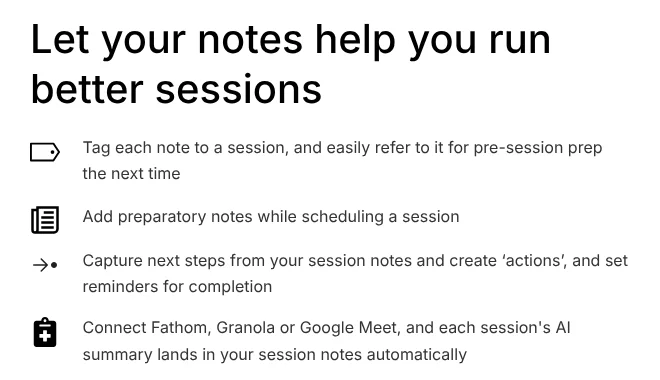
Your frog is the task you keep avoiding, such as a hard follow-up call, a proposal or a pricing change. Do it before email. Notes from your last session make tomorrow’s frog easier to pick, and in Simply.Coach you can tag your session notes to each session, so pre-session preparation is a quick read.
7. The Iceberg Method
The Iceberg Method ranks the work on your list by impact, so most of your hours go to the few tasks that move your practice forward. The small, visible tasks get done too, but they stop running the day.
Try it on a Monday list. Mark the one or two items that would change your month, such as launching a program or finishing a case study, and give them your best hours. Everything else fits around them, and low-value activities get the time that is left.
8. Bullet Journaling
Bullet journaling is a paper system created by Ryder Carroll, who built it to manage his own attention. Its official site describes it as centered on intentionality: asking why you do what you do and which tasks matter most right now.
A coach can use one notebook for the daily task list, the week’s sessions, goals for the month and loose ideas. The format is flexible, so you can adjust it as your practice changes. The trade-off is that paper does not search or share, so it suits you best if you think better with a pen and your client records live elsewhere.
9. Autofocus
Autofocus is a system created by time management author Mark Forster. It uses one long list of everything you have to do, written in a notebook.
You read through a page, then move slowly down it until one item stands out. Work on that item for as long as you feel like doing so, cross it off and re-enter it at the end of the list if it is unfinished. If nothing on a page stands out, you dismiss the items on it.
It is built for a messy backlog, which makes it a good fit for the long tail of small coaching tasks: replying to old emails, updating your website, tidying templates. Because you can stop whenever you like, it also helps you avoid the feeling of being stuck on one job.
10. The 2-Minute Rule
The 2-Minute Rule says that if a task takes less than two minutes, do it right away. Writing it down and tracking it would take longer than finishing it.
Use it on small coaching jobs such as confirming a time, sending a payment reminder or forwarding a resource. Do these during your admin block rather than in the middle of focused work, or the rule becomes a steady stream of interruptions.
11. The 4D Technique
The 4D Technique gives every task one of four fates: do it, delegate it, defer it or delete it. It is quick to run on an overflowing inbox, because each item needs only one decision. Defer what needs a date and delete what has no reason to exist, then look at what is left to delegate.
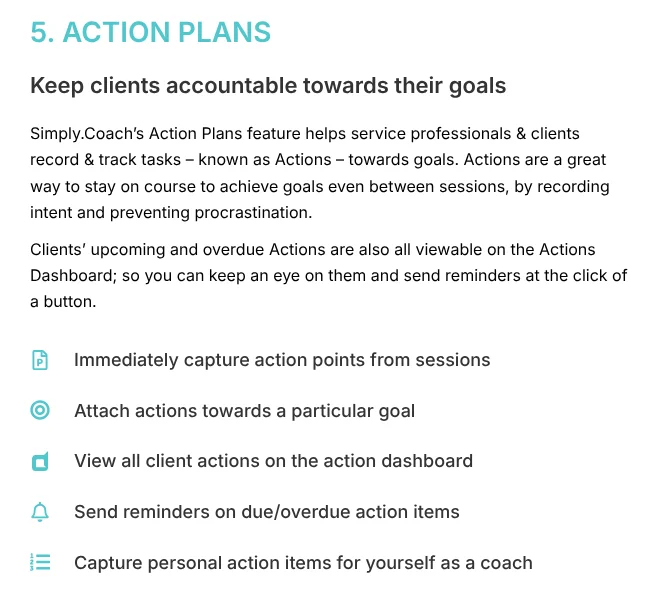
Delegating is the part coaches skip most often, and part of it can go to a system instead of a person. Chasing clients for the actions they agreed to between sessions is a good example. The Action Plans feature in Simply.Coach lets you record actions against client goals, see upcoming and overdue ones on one dashboard and send a reminder with a click.
12. The 1-3-5 Rule
The 1-3-5 Rule caps a day at one big task, three medium tasks and five small ones. Starting with the big one and finishing it first gives the day a clear spine.
For a coach, the big task might be building a workshop, the medium ones three client follow-ups and the small ones five quick admin items. On a heavy client day, let the sessions be the big task and shrink the rest. The cap is the point: it stops a long list from making every day feel like a failure.
Time Management Practices That Work for Coaches
A method only helps if you apply it steadily, and three habits do most of that work. They apply whichever method you picked.
1. Set SMART goals
Goals tell you which tasks deserve your time. Make each one specific, measurable, achievable, relevant and time-bound, so you can tell when it is done. Break large goals into shorter tasks, then track and adjust them as the practice changes.
2. Plan in quarters
Plan each quarter by choosing the 90-day goals that matter most, then break them into actionable tasks with deadlines. This keeps steady progress visible and stops the urgent from crowding out the important. A digital coaching platform keeps session notes, actions and your schedule in one place, which makes the end-of-quarter review a quick look instead of a search.
3. Keep learning and adapting
Stay current on time management ideas through webinars, books and courses, then adapt what you learn to your own needs. Treat each method as an experiment: if it adds more admin than it saves, change it.
Conclusion
Time management for coaches is a planning problem before it is a tool problem. Decide how your week divides between sessions, preparation, admin and marketing, protect each block and review the plan every week.
Then pick one method that fits how you think and run it for a month. If it cuts your admin, it stays, and if it adds admin, it goes.
The aim is a practice that serves clients well and still leaves time for your own life. A plan that protects your rest as well as your sessions is one you can keep up.
Key Takeaways
- Plan the week: give sessions, preparation, admin and marketing their own blocks before the week begins.
- Protect marketing time: treat the slot like a client appointment, because it is the first block to vanish.
- Batch your sessions: set days or half days keep open stretches free for focused work.
- Sort before you schedule: separate urgent from important so the work that grows your practice gets a slot.
- Choose one method: try it for a month and keep it only if it saves more time than it costs.
- Review every week: look at what happened, move what slipped and set the next blocks.
- Guard your rest: when every block is full, the fix is fewer commitments, not a cleverer system.
If your protected admin hours go on chasing notes, follow-ups and client actions across different tools, Simply.Coach brings them into one place. Its client management features keep session notes, goals and actions together, so your planning time goes to the work that grows your practice.
Frequently Asked Questions (FAQs)
How do coaches manage their time?
Most coaches split the week into blocks for sessions, preparation and notes, admin and marketing. Sessions sit on set days, admin is batched into one or two blocks and marketing gets a recurring slot. A weekly review keeps the plan honest by moving what slipped into next week's blocks.
What is the best time management method for a coach?
No single method wins. Time blocking suits planning your week, Getting Things Done suits a crowded inbox and the Eisenhower sort suits too many urgent requests. Match the method to your biggest time leak, try it for a month and keep it only if it saves more time than it costs.
How do I find time for marketing as a busy coach?
Give marketing a recurring block and treat it like a client appointment, so it is not the first thing you cancel. Use each block for one job, such as drafting a post or contacting a referral partner, and keep a short list of next tasks so you can start straight away.
How much time should I leave between client sessions?
Leave enough time to write your notes and reset before the next client arrives, and set that gap as a standard buffer in your calendar. Short gaps tempt you to skip notes, while a consistent buffer keeps preparation and follow-up inside the working day instead of the evening.
How do I stop client sessions from running over?
Agree the end time at the start and keep an eye on it as the session goes. Leave a few minutes for next steps so you close on purpose, and keep a buffer after each session so one long call does not push back everything that follows.
What does a time management coach do?
A time management coach works with clients on priorities, planning and habits so they use their hours better. The methods here cover a different case: a coach managing their own business time. If you coach clients on time, they can also be adapted as exercises for them.
Can I use the Pomodoro Technique in a coaching business?
Yes, for work with no client on the line, such as writing content or building a program. Work on one activity in a focused session, record interruptions and take a break when the timer ends. Keep the timer out of client sessions, where it would break your attention.