Your IT lead joins the vendor call and asks whether people can sign in to the coaching platform with the work account they already use. For coaching platform SSO, the answer differs by vendor. Torch and Boon publish SAML 2.0 single sign-on, Simply.Coach offers it on its Enterprise plan, and Growthspace says nothing about it on its public pages.
SCIM, the standard that creates and removes accounts automatically, is a separate question that most of these vendors leave unanswered. Below, you will find what SSO, SAML and SCIM each do, what four coaching platforms publish about them, and the admin controls and vendor questions to settle before you sign.
TL;DR
Single sign-on (SSO) lets people open a coaching platform with the account their company already manages, and SAML 2.0 is the protocol the vendors checked here publish for it. SCIM is a different standard that creates, updates and removes accounts automatically. Boon is the only one of the four to state a SCIM position, and it says SCIM is not currently available. Torch sells SAML as an additional service and Boon names Okta and Microsoft Entra ID. The publisher of this comparison offers it on an Enterprise plan, and Growthspace says nothing about SSO on its public pages. Ask every vendor for its SAML and SCIM documentation, the admin roles it ships and what an admin can read.
What Do SSO, SAML and SCIM Each Do?
SSO, SAML and SCIM are three separate parts of an identity setup, and a coaching platform can offer one without the others.
1. How Does a SAML Sign-In Work?
Single sign-on means a person signs in once with their company account and reaches the coaching platform without a second username and password. Microsoft describes the identity provider as the system that verifies each user and confirms their identity to the app, which lets admins control access from one place. Microsoft Entra ID and Okta are two examples of identity providers.
Cloud apps usually connect to the identity provider with SAML or OpenID Connect, and SAML 2.0 is the protocol Torch and Boon publish. Okta calls this a service provider initiated sign-in. The person starts at the coaching platform, the platform sends them to the identity provider, and the identity provider returns a SAML response that vouches for them.

2. What Does SCIM Add That SSO Does Not?
SSO decides who can sign in, but it does not create the account or remove it when someone leaves. SCIM, the System for Cross-domain Identity Management, is the open standard for that job.
Okta describes it as a way to automate the exchange of user identity data between company systems and cloud apps. That includes revoking access at the end of employment. Microsoft Entra uses SCIM 2.0 to provision and deprovision users and groups.
The protocol itself is published as IETF RFC 7644. When a vendor has no SCIM, someone still has to add and remove people by hand, by CSV upload or by a sync from the HR system. Know which before you sign.
How We Compared These Platforms
What we compared: four coaching platforms, named in the table below, on SSO, SAML, SCIM and admin roles.
How we chose them: each sells coaching software to organizations rather than only to individual coaches, and each publishes a security, help-center or product page a buyer can open.
Where the details come from: each vendor’s own help-center, enterprise, security and product pages, plus Microsoft and Okta documentation for how the standards work.
What we left out: CoachHub and BetterUp, because a dated screenshot of their SSO details could not be taken. Any detail a vendor does not publish is left out too.
What to remember: a missing line on a public page does not prove a missing feature, so ask the vendor to confirm in writing.
What Do These Platforms Publish About SSO, SAML and SCIM?
The table shows what each vendor states on its own pages, checked on 24 November 2026. “Not stated” means the pages read say nothing either way.
| Platform | SSO and SAML | SCIM | Where it is stated |
|---|---|---|---|
| Torch | SAML 2.0 as an additional service | Not stated | Torch help center, SAML SSO article |
| Boon | SAML with Okta, Entra ID or any SAML 2.0 provider | Not currently available | Boon enterprise page |
| Simply.Coach | SAML on the Enterprise plan | Not stated | University coaching software page |
| Growthspace | Not stated | Not stated | Home page and privacy notice |
1. What Does Torch Say About SSO?
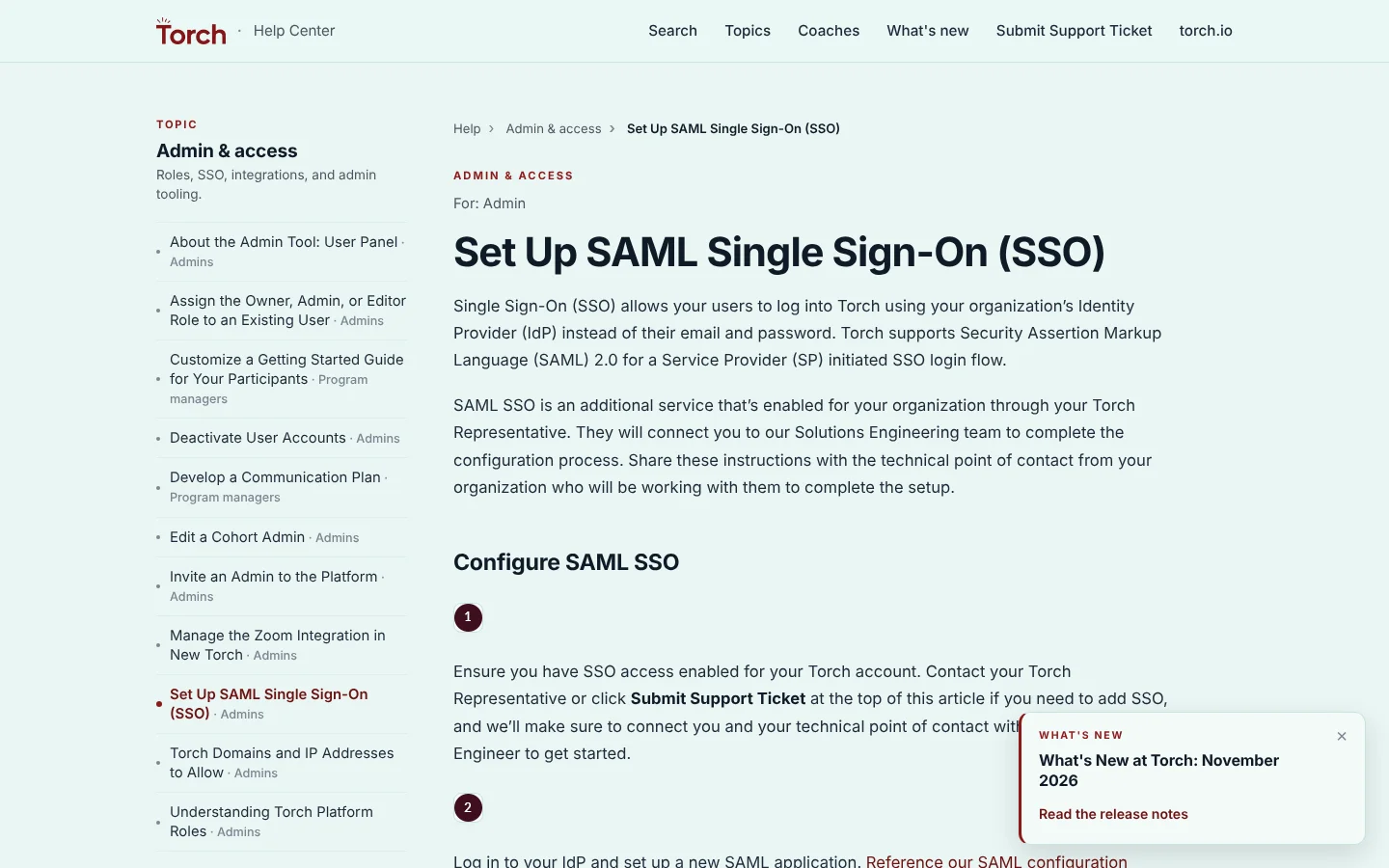
Torch’s help center says the platform supports SAML 2.0 for a service provider initiated login. It adds that SAML SSO is an additional service enabled through your Torch representative, who brings in a Solutions Engineering team to finish the configuration. The article does not mention SCIM.
2. What Does Boon Say About SSO?
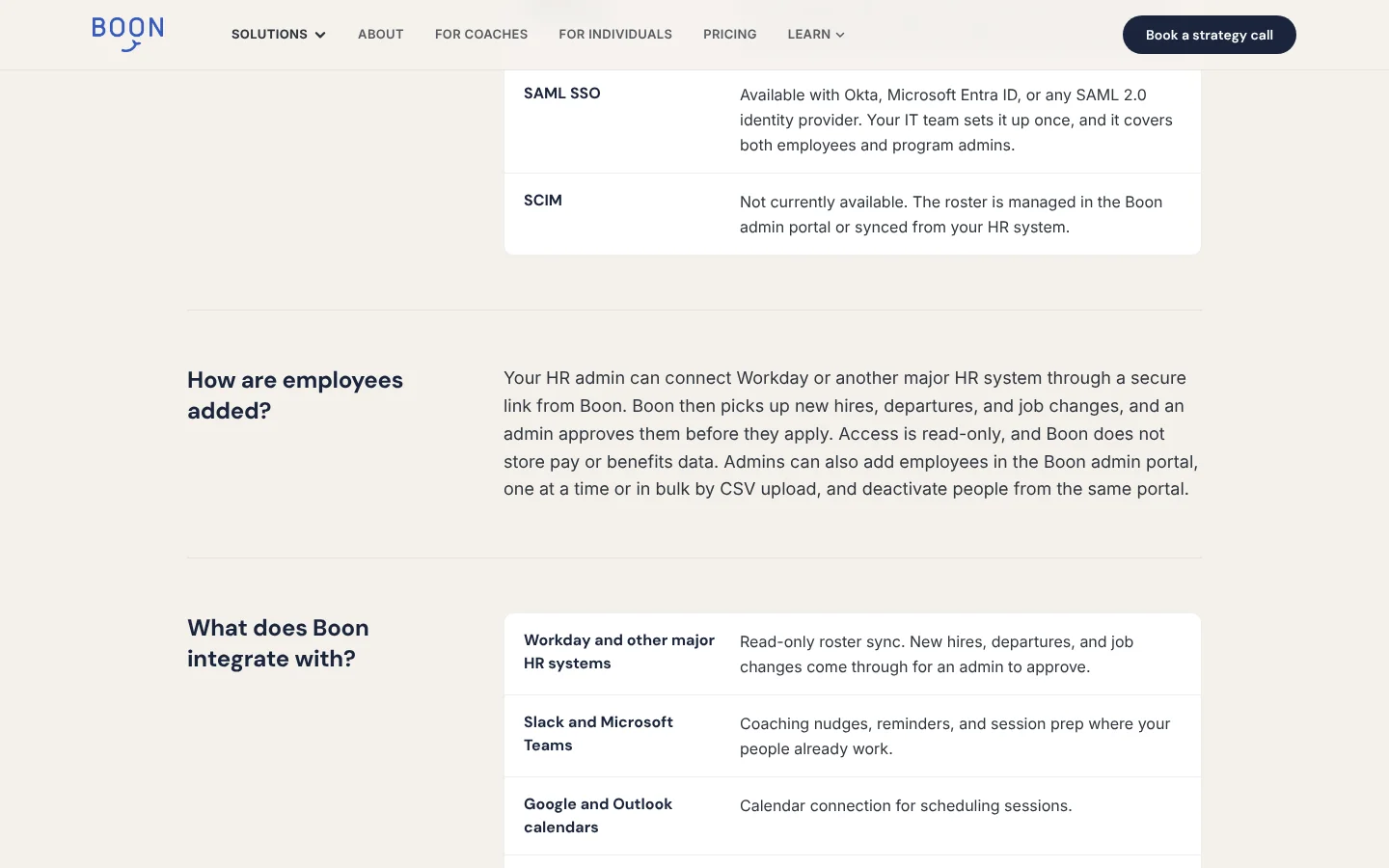
Boon’s enterprise page says SAML SSO works with Okta, Microsoft Entra ID or any SAML 2.0 identity provider. Your IT team sets it up once, and it covers both employees and program admins. It also says SCIM is not currently available, and that the roster is managed in the Boon admin portal or synced from your HR system.
3. What Does Simply.Coach Say About SSO?
The comparison is published by Simply.Coach, so read this entry with that in mind. Its university coaching software page states that single sign-on with SAML is available on the Enterprise plan. That page does not mention SCIM, and the security page states role-based access through IAM without mentioning SSO, so a buyer who needs SCIM should ask for it directly.
4. What Does Growthspace Say About SSO?
Growthspace’s home page and privacy notice describe its platform and how it handles personal data, and neither mentions single sign-on, SAML or SCIM. That does not prove it lacks them, but a buyer cannot confirm the sign-in options from those pages and should ask before shortlisting it.
Which Admin Controls Matter Beyond Sign-In?
Sign-in decides who gets through the door. Admin controls decide what each person can do once inside, so check who can invite people, who can deactivate them, how far an admin’s reach extends and whether admins can read coaching content.
Boon puts the roster work in its admin portal. As the page shown above says, admins can add employees one at a time or in bulk by CSV upload and deactivate people from the same portal. A sync from an HR system brings in hires and departures for an admin to approve.
The university coaching software page also says admins or program leads can be assigned to specific groups and that admins do not see session content or notes. That separation protects client confidentiality, because a program owner can see that coaching is happening without reading it.
Identity is one part of a security review. A buyer who also needs a data processing agreement and a subprocessor list can compare vendors in GDPR compliant coaching platforms, and certification evidence is a separate request.
What Should You Ask a Coaching Platform Vendor?
Vendor questions sit beside the wider checklist for choosing software for coaches, and they matter most on an enterprise coaching platform, where IT signs off on access.
- Which protocols do you support for SSO: SAML 2.0, OpenID Connect or both?
- Does sign-in start at your platform, at our identity provider or either way?
- Is SSO in the plan we are quoted, or an extra service?
- Do you support SCIM 2.0, and if not, how are accounts added and removed?
- Can an account be created at first sign-in, or must we assign every person in our identity provider first?
- Which admin roles exist, and can an admin be limited to one program or workspace?
- Can admins read session content or notes?
- Which email domains can use SSO, and how do external coaches sign in?
Get the answers in writing. The headline price may not include SSO, so read coaching software pricing alongside the quote you receive.
Conclusion
Coaching platform SSO is a question to settle with documents, not a tick on a feature list. Torch and Boon publish SAML 2.0 details, a third vendor states SAML on its Enterprise plan, and Growthspace’s public pages are silent, so a buyer has to ask.
SCIM is the second question, and the answer decides who maintains the roster. Simply.Coach is built around coaching programs where admins oversee groups without reading session notes, and its Enterprise plan includes SAML single sign-on. If you need SCIM, ask for it in writing before you commit.
Key Takeaways
- Separate the standards. SSO and SAML control sign-in, while SCIM controls account creation and removal, so ask about each one.
- Ask for documents. A page that names SAML 2.0 and your identity provider tells you more than a feature tick.
- Check the plan. Torch calls SAML an additional service and another vendor offers it on an Enterprise plan, so confirm it is in your quote.
- Plan without SCIM. Boon says SCIM is not currently available, so agree who adds and removes accounts.
- Ask who sets it up. Torch routes SAML setup through its Solutions Engineering team and Boon says your IT team sets it up once, so ask who does the work on your side.
- Limit admin reach. Ask whether an admin can be limited to a group or workspace and whether admins can read session notes.
- Treat silence as a question. Growthspace’s public pages do not mention SSO, so ask rather than assume.
If your coaching program needs sign-in through the company identity provider, Simply.Coach offers SAML single sign-on on its Enterprise plan and lets admins oversee groups without reading session notes. See how the platform works for learning and development teams.
Frequently Asked Questions (FAQs)
What is a SSO platform?
A single sign-on platform lets people use one company account to reach several apps. For a coaching platform, that means signing in through your identity provider, such as Microsoft Entra ID or Okta, instead of creating a separate username and password for the coaching service.
Does a coaching platform need SAML, or is OpenID Connect enough?
Either can work. Microsoft says cloud apps usually use SAML or OpenID Connect, and the vendors checked here that name a protocol publish SAML 2.0. Ask any vendor which protocols it supports, and whether sign-in can start at the platform or at your identity provider.
What does SCIM add that SSO does not?
SSO controls who can sign in. SCIM creates, updates and removes the accounts themselves, so someone who leaves your company can lose access without a manual step. Boon states that SCIM is not currently available, so check each vendor and ask how accounts are removed.
Which coaching platforms support SSO?
Torch publishes SAML 2.0 single sign-on as an additional service, Boon publishes SAML with Okta, Microsoft Entra ID or any SAML 2.0 provider, and Simply.Coach offers SAML on its Enterprise plan. Growthspace's public pages checked here do not mention SSO, so ask it directly.
Is SSO included in the price of a coaching platform?
Not always. Torch describes SAML SSO as an additional service enabled through its representative, and Simply.Coach states SAML is available on its Enterprise plan. Ask each vendor whether SSO sits in the plan you are quoted, and get the answer in writing.
Who sets up SSO with a coaching platform vendor?
It varies. Torch says SAML SSO is enabled through your Torch representative, who brings in a Solutions Engineering team to finish the configuration, while Boon says your IT team sets it up once. Ask each vendor who does what and what you must supply.
What admin roles should a coaching platform have?
At minimum, a role that manages the whole account, a role limited to specific programs or groups, and a clear rule on what each can see. Simply.Coach states that admins can be assigned to specific groups, so ask every vendor whether admin reach can be narrowed the same way.
Should program admins be able to read coaching sessions?
Not by default. Simply.Coach states that admins do not see session content or notes, which lets a program owner track activity without reading it. Ask every vendor what each admin role can see, because the answer affects client confidentiality.