Coaches often lose track of coaching agreements, non‑disclosure agreements (NDAs), and payment milestones when they manage contracts with spreadsheets and scattered files. Poor contract handling can drain 8–9% of your revenue and increase errors in your business documents. Manual systems make it easy to miss renewal dates and lose signed agreements in folders or inbox threads. Automation can reduce administrative contracting costs by 25–30%, cutting out repetitive tasks that weigh you down.
Contract management software helps you create, sign, track, and store client agreements with reminders for deadlines and secure digital signatures. These tools replace messy spreadsheets with organized templates and centralized records that improve accuracy and save time. Instead of scrambling through files, you can focus on delivering coaching results.
In this article, you will discover the best contract management software for coaches in 2026. You will see a ranked list of top tools, detailed features that matter to coaches, and clear tips to choose the right solution for your practice.
Key Takeaways
- Coaches often lose revenue and time managing agreements, NDAs, and payments with spreadsheets or scattered files.
- Contract management software centralizes client contracts, automates reminders, and supports secure digital signatures.
- Key benefits include faster client onboarding, automated templates, renewal tracking, legal compliance, and improved client experience.
- Essential features for coaches: pre-built templates, e-signatures, automated alerts, centralized repository, CRM/calendar integrations, and mobile access.
- Top tools in 2026: Simply.Coach, PandaDoc, Concord, ContractWorks, HoneyBook, DocuSign CLM, Ironclad, Juro, LinkSquares, and Evisort.
- Choosing the right software depends on contract volume, budget, e-signature vs full CLM needs, required integrations, and scalability.
- Investing in the right contract management system like Simply.Coach reduces errors, prevents missed deadlines, and allows coaches to focus on delivering results.
Why Coaches Need Contract Management Software
Missing a single deadline or misplacing a signed contract can delay sessions, create confusion, and even cost you revenue. A contract management software solves these specific challenges by keeping all agreements organized, automating routine tasks, and giving you full visibility over client commitments.
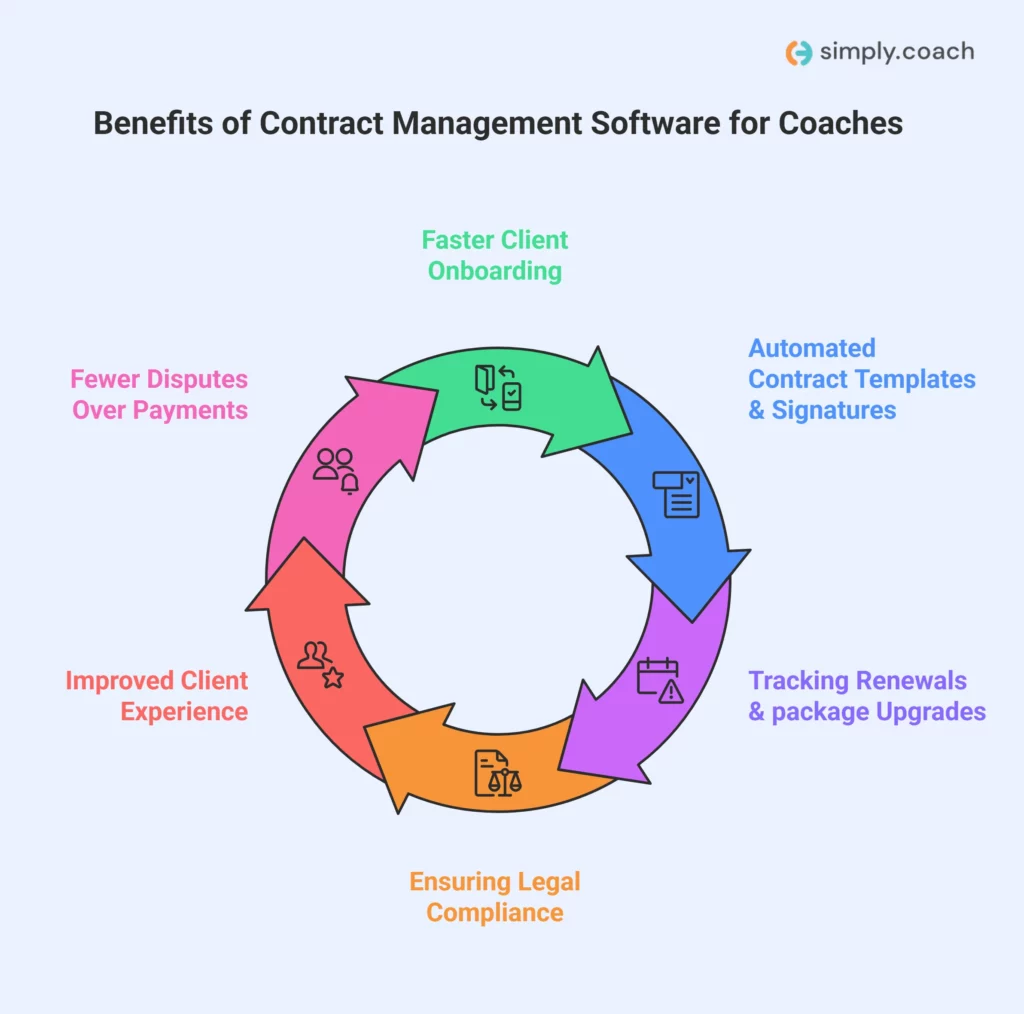
Here are the key benefits that make contract management software essential for coaches:
- Faster client onboarding: You can send coaching agreements and NDAs instantly, allowing clients to start sessions without delays. Manual paperwork often causes confusion and slows onboarding.
- Automated contract templates and signatures: Reuse pre-made templates for one-on-one or group coaching. Digital signatures eliminate back-and-forth emails and ensure contracts are completed correctly the first time.
- Tracking renewals and package upgrades: The software alerts you when packages expire or sessions need renewal. This prevents missed payments and gives you a chance to offer upgrades proactively.
- Ensuring legal compliance: Built-in features help you maintain accurate NDAs, liability waivers, and coaching agreements. You reduce risks of disputes or legal issues.
- Improved client experience: Clients can review, sign, and store agreements online. Clear deadlines and payment terms create trust and reduce misunderstandings.
- Fewer disputes over payments or services: Automatic reminders and well-organized agreements ensure both you and your clients understand session commitments, timelines, and deliverables.
A contract management software directly addresses the unique challenges of running a coaching business, freeing you from administrative headaches and helping you focus on delivering results to clients.
Also read: What Makes a Good Coaching Contract? Your Complete Checklist
What to Look for in Contract Management Software
Choosing the right contract management software can make a tangible difference in how efficiently you manage client agreements and payments. Here are the key features coaches should prioritize:

- Easy contract creation + coach-specific templates: Look for software that offers pre-built coaching templates, including NDAs, session agreements, and program packages. This saves you from drafting contracts repeatedly and ensures every agreement meets your specific coaching requirements.
- e-Signature support: The software should allow clients to sign agreements remotely. Digital signatures prevent delays caused by printing, scanning, or mailing contracts, letting clients start coaching sessions immediately.
- Automated reminders: Choose a platform that alerts both you and your clients about upcoming renewals, session packages, or missed payments. This prevents revenue loss and reduces the need to manually track deadlines.
- Centralized repository: All contracts, NDAs, and payment records should be stored in a single secure location. A centralized system makes it easy to retrieve past agreements, verify client commitments, and avoid misplaced documents.
- CRM & calendar integrations: Integration with your calendar and CRM helps you link contracts directly to client profiles. You can schedule sessions, track coaching milestones, and manage communication without switching between tools.
- Mobile access: Opt for software that works on mobile devices. Coaches often meet clients virtually or on-the-go, and having contract access on a phone or tablet ensures you can review or send agreements anytime.
A contract management tool with these features streamlines your workflow, reduces errors, and ensures clients experience a professional, reliable process from start to finish.
Best Contract Management Software for Coaches in 2026
Managing contracts manually can slow your coaching practice, cause missed renewals, and create confusion around client agreements. Using the right software keeps all contracts organized, ensures timely signatures, and reduces administrative errors, so you can focus on delivering sessions without interruptions.
Before exploring each software in detail, let’s have a side-by-side comparison to see the key features, pricing, and ratings at a glance.
| Software Name | Best For | Pricing (Approx.) | G2 Rating | Capterra Rating |
| Simply.Coach | All‑in‑one platform combining coaching, calendars, and contracts | Starts $9/mo | 4.8/5 (144 reviews) | 4.6/5 (40 reviews) |
| PandaDoc | Contract and document creation with e‑signatures | Starts $19/user/mo (Essentials); $49/user/mo (Business) | 4.7/5 (3,284 reviews) | 4.5/5 (1,233 reviews) |
| Concord | Unlimited documents and collaborative editing | $499/mo (Essentials, 5 users) | 4.2/5 (133 reviews) | 4.6/5 (235 reviews) |
| ContractWorks | Simple contract storage and reminders | Pricing on request | 4.6/5 (95 reviews) | 4.7/5 (96 reviews) |
| HoneyBook | Combined CRM, contracts, scheduling, and payments | $29/mo Starter (billed annually); $36.75/mo Essentials; $81.75/mo Premium | 4.5/5 (186 reviews) | 4.7/5 (671 reviews) |
| DocuSign CLM | E‑signature with workflow and automation (enterprise tier) | $10/mo/user Personal plan; $25/mo/user Standard plan; $40/mo/user Business Pro plan (all plans billed annually).Custom pricing for Enhanced plans | 4.3/5 (2,555 reviews) | 4.5/5 (9,158 reviews) |
| Ironclad | Custom workflow automation for larger practices | Custom pricing (quote required) | 4.5/5 (285 reviews) | 4.4/5 (60 reviews) |
| Juro | Browser‑based contract workflow and editing | Custom pricing (business quote) | 4.6/5 (177 reviews) | 4.8/5 (39 reviews) |
| LinkSquares | Post‑signature analytics and contract insights | Custom pricing (enterprise) | 4.7/5 (424 reviews) | 4.2/5 (36 reviews) |
| Evisort | AI‑driven contract data extraction | Custom pricing (enterprise) | 4.7/5 (90 reviews) | 4.8/5 (19 reviews) |
1. Simply.Coach
Best for
Coaches who need a single platform to manage client contracts, schedule sessions, and track coaching progress without switching between multiple tools. Simply.Coach combines agreements, session automation, and client engagement features in one place, helping you spend less time on admin and more time with clients.
Key features
- Contract handling and e‑signatures: Create digital contracts, send them to clients, and collect signed agreements without using separate tools.
- Session scheduling and reminders: Sync with calendars, allow client self‑booking, and send automated reminders to reduce no‑shows.
- Integrated client portal: Clients access signed agreements, action plans, goals, and resources in a secure dashboard.
- Goal and progress tracking: Define client goals and track progress step by step to show measurable outcomes.
- Reusable templates:Save contract and program templates to avoid repetitive setup for each new client.
Pricing
Simply.Coach offers a 14‑day free trial so you can test features before subscribing. Paid plans start at $9 per month for basic coaching and contract tools, and go up to $69 per month for unlimited clients and white‑label options.
| Pros | Cons |
| Combines contracts, scheduling, and coaching tools in one platform | The platform’s many features might take some time to get familiar with. However, the customer support team of Simply.Coach is rated highly for easing the whole onboarding process |
| Built-in reminders reduce missed sessions and payments | Some advanced features require higher‑tier plans |
| Integrated client portal improves engagement and clarity |
2. PandaDoc

Best for
Coaches who need a reliable way to create, send, sign, and track coaching contracts, proposals, and agreements in one workflow. PandaDoc works well when you manage multiple client documents and want visibility into when agreements are viewed, signed, or pending.
Key features
- Contract and document creation: You can create coaching agreements using editable templates, reducing time spent drafting contracts for each client.
- Legally binding e-signatures: Clients sign agreements online from any device, and you receive real-time status updates.
- Document tracking: You see when a client opens, reviews, or completes a contract, which helps avoid follow-ups.
- Integrations with CRM tools: Client data syncs from connected systems, reducing manual entry across documents.
- Payment support: Contracts can include pricing tables and payment collection within the same signing flow.
Pricing
PandaDoc offers a free e-signature plan with limited features. Paid plans start at $19 per user per month for Starter and $49 per user per month for Business, with Enterprise pricing available on request.
| Pros | Cons |
| Easy-to-use editor for contracts and coaching documents | Per-user pricing increases costs as teams grow |
| Built-in e-signatures remove the need for extra tools | Advanced automation requires higher plans |
| Real-time document tracking improves follow-ups | Annual billing offers better pricing but less flexibility |
| Supports payments within signed agreements | Not built specifically for coaching workflows |
3. Concord

Best for
Coaches or coaching teams that manage a high volume of contracts and need strong collaboration, negotiation, and centralized storage. Concord is suited when multiple stakeholders review or sign agreements and deadlines must be closely tracked.
Key features
- Unlimited contracts and e-signatures: You can send and sign as many agreements as needed without signature limits.
- Live contract collaboration: Contracts can be edited, commented on, and negotiated directly inside the platform.
- Automated deadline tracking: Renewal and expiration reminders help you stay on top of client agreements.
- Contract data extraction: Key terms and dates are automatically captured, reducing manual tracking.
- Approval workflows: Structured approval paths ensure contracts move through review stages without delays.
Pricing
Concord plans start at $499 per month (paid annually) for five users on the Essentials plan. Higher tiers, $899 per month for the Business plan and $1299 for the Enterprise plan, add approval workflows, intake forms, and advanced controls.
| Pros | Cons |
| Unlimited documents and e-signatures included | Higher entry price for solo coaches |
| Strong collaboration and negotiation tools | Annual billing is required |
| Automated reminders reduce missed renewals | Coaching-specific features require setup |
| Centralized contract storage improves visibility | Advanced features only in higher plans |
4. ContractWorks

Best for
Coaches who need a reliable system to store, track, and manage signed agreements, reminders, and contract drafts in a secure, searchable repository. ContractWorks helps you keep all coaching contracts in one place with alerts and automation so nothing slips through the cracks.
Key features
- Central contract repository: Store all your coaching agreements in a secure cloud location that you can access from anywhere, keeping everything organized and searchable.
- Automated alerts: Set reminders for contract renewals, payment milestones, and expirations so you never miss an important date.
- Smart tagging & OCR search: Tag key data points and use optical character recognition (OCR) to instantly find relevant contracts or clauses.
- Built-in e-signatures: Send contracts for signature and automatically file signed documents without needing a third tool.
- Custom reporting: Generate reports that give you an overview of contracts, deadlines, and key obligations.
Pricing
ContractWorks follows the pricing on request model offering monthly pricing with annual billing that includes unlimited users and a set number of documents and signature licenses for the Standard plan, with the Premium tier offering more capacity and capabilities.
| Pros | Cons |
| Unlimited users and built-in e-signatures included in plans | Higher starting price may be more than some solo coaches need |
| Automated alerts and reminders reduce missed obligations | Pricing tiers based on document limits can be restrictive |
| Smart tagging and OCR search save time on retrieval | Not tailored specifically to coaching workflows (general contract focus) |
| Centralized repository improves contract visibility | Mobile editing features are limited compared to some competitors |
5.HoneyBook

Best for
Coaches looking for a platform that combines client management, scheduling, proposals, and contract workflows with payment processing in one service. HoneyBook blends contract templates with CRM and project tracking so you can manage coaching engagements more holistically.
Key features
- Proposals with contracts: Create polished proposals that include coaching contracts, pricing, and payment terms in one integrated document.
- Contract templates: Use reusable contract templates that you can customize for different coaching packages.
- Online signatures: Clients can sign contracts directly within the platform, and you can track status easily.
- Client portal: Provide a central space where clients can view contracts, invoices, and project details.
- Scheduling and automation: Book sessions, automate reminders, and integrate calendars to keep coaching appointments on track.
Pricing
HoneyBook offers plans with annual billing that start at $29/month for Starter, $36.75/month for Essentials, and $81.75/month for Premium when billed yearly. Each plan includes unlimited clients, contracts, and projects.
| Pros | Cons |
| Combines contracts, CRM, and payments in one dashboard | Pricing can feel high for solo coaches just starting out |
| Unlimited clients and projects on all plans | Contract reporting features are less advanced than dedicated CLM tools |
| Client portal improves agreement transparency | Some automation features are limited to higher plans |
| Scheduling and invoices alongside contracts lessen tool switching | Payment processing fees apply on transactions |
6. DocuSign CLM

Best for
Coaches working with complex or high-volume contracts who want powerful automation, customizable workflows, and deep integrations. DocuSign CLM helps you generate, route, and manage contracts centrally with built-in controls and analytics.
Key features
- Dynamic contract creation: Use templates and data to auto-generate agreements, reducing manual drafting.
- Workflow automation: Build automated contract routing for review, approval, and signature using drag-and-drop tools.
- Central repository: Store all agreements in one searchable place with access control and metadata tagging.
- AI insights: Analyze clauses, extract key terms, and get data-driven insights that help reduce risk and shorten cycle times.
- Integration flexibility: Connect with other business tools (CRM, collaboration apps) to streamline data across systems.
Pricing
DocuSign CLM pricing starts at $10/month/user for the Personal plan, $25/month/user for the Standard plan and $40/month/user for the Business Pro plan, all billed annually. They also offer Enhanced plans that are customized and available through sales consultation based on features, users, and contract volume.
| Pros | Cons |
| Powerful automation and workflow capabilities | Custom pricing can be expensive for small practices |
| AI-driven contract intelligence and analytics | Setup complexity may require training or implementation effort |
| Centralized contract repository with permissions | Not specifically built for coaching workflows |
| Workflow automation accelerates contract execution | Requires involving sales/contract teams for accurate cost estimates |
7. Ironclad

Best for
Coaches (especially those in larger practices or multidisciplinary programs) who need powerful automation, workflow control, and AI-assisted contract processing for complex agreements involving templates, negotiations, and approvals. Ironclad is built to support sophisticated contract setups with high customization and automation.
Key features
- No-code workflow automation: You can design automated routing and approval steps without coding, keeping contracts moving from draft to signature.
- Central repository with search: Contracts are stored in one searchable cloud location, so you spend less time digging through folders.
- AI-assisted processes: Smart automation quickly extracts metadata, tags documents, and helps accelerate routine tasks like renewals and reminders.
- Collaborative editing: Review and redline contracts in a shared workspace with version history and @mentions.
- Integration flexibility: Connect Ironclad to apps like Salesforce, Slack, or Box to streamline your existing contract workflows.
Pricing
Ironclad does not list public pricing because costs are tailored based on your organization’s size, contract volume, and workflow complexity. Annual investment typically runs into the tens of thousands of dollars, and exact pricing requires a sales consultation.
| Pros | Cons |
| Highly configurable automation and workflow control for complex contract lifecycles | Custom pricing and enterprise focus may be overkill for solo coaches |
| Strong AI-powered metadata tagging and search | Implementation and setup require more time and expertise |
| Centralized contract repository with collaboration tools | No transparent pricing makes budgeting harder |
| Integrates with widely used business systems | Designed more for legal and enterprise teams than individual coaches |
8. Juro

Best for
Coaches seeking intelligent contract management that works collaboratively with your team and existing tools, without per-user fees. Juro gets contracts agreed faster by embedding AI-assisted workflows directly into your operations.
Key features
- Unlimited users and workflows: Every plan includes unlimited users, workflows, and templates so you aren’t billed per head.
- AI-assisted contract creation: Juro’s platform lets you automate drafting and reviewing using artificial intelligence, reducing repetitive work.
- Browser-native collaboration: Edit, negotiate, comment, and approve contracts directly in your browser, without back-and-forth emails.
- Template and workflow reuse: Save frequently used coaching contract templates and apply them instantly for new clients.
- Integration support: Juro connects with common tools like Slack and CRM systems to streamline sharing contract data.
Pricing
Juro uses customized pricing based on your contract workflows, volumes, and integrations, pricing is not listed openly on the site. Plans cover unlimited users and templates, and exact cost requires contacting sales for a quote.
| Pros | Cons |
| Unlimited users remove per-seat cost concerns | No public pricing makes initial decision harder |
| AI-powered contract automation speeds up drafting and approvals | May be more than coaches need if your contracts are simple |
| Browser-native editing simplifies collaboration | Deep integrations often cost extra |
| Integrates with tools you already use, reducing workflow friction | Targeted at mid-sized and enterprise teams more than solo coaches |
9. LinkSquares

Best for
Coaches or coaching teams that want a centralized, AI-assisted contract management platform with strong analytics, data extraction, and risk tracking from executed contracts onward.
Key features
- AI contract analytics: Automatically extract key dates, clauses, and terms to identify opportunities or risks across your coaching agreements.
- End-to-end CLM: Manage contract creation, review, approval, signing, and analytics all from one connected platform.
- AI-driven search: Use advanced AI tagging and text search to locate contracts and clauses instantly.
- Approval workflows: Build and enforce multi-step review processes so contracts move smoothly through stakeholders.
- Project & task management: Generate tasks and assign action items to keep contract-related work on track.
Pricing
LinkSquares does not publish fixed pricing; instead, you request a demo and receive a tailored quote. Estimates from industry sources suggest basic packages often start around $10,000–$15,000 per year and can rise significantly based on usage and modules selected.
| Pros | Cons |
| AI-driven analytics provide deep visibility into contract data | Custom quotes mean you must engage sales for pricing |
| Central contract repository improves organization | Can be more than you need if you run simple coaching contracts |
| Strong reporting helps with renewal planning and risk tracking | Enterprise lean tools may challenge solo coaches |
| Integrates with many common systems to reduce manual entry | Implementation and pricing complexity may be higher |
10. Evisort

Best for
Coaches in larger practices or coaching enterprises who prioritize AI-powered insights and deep contract understanding across large portfolios. Evisort uses proprietary AI to extract data, track obligations, and automate workflows from contract intake through execution.
Key features
- AI contract intelligence: Evisort’s proprietary AI converts contract text into structured data you can act on without manual extraction.
- Smart search & discovery: Use AI to find clauses, terms, and risks instantly across all contracts.
- Automated workflows: Build and execute review, approval, and obligation tracking workflows tailored to your coaching business processes.
- Dashboards & reporting: Visual dashboards provide real-time insights into contract statuses, key deadlines, and performance metrics.
- Cross-team collaboration: Comments, versioning, and audit logs keep everyone aligned through negotiation and execution stages.
Pricing
Evisort does not list public pricing and instead provides custom quotes based on your contract volume, integrations, and automation requirements. Median reported annual spend for organizations using Evisort is around $38,000 per year, but exact pricing depends on your needs.
| Pros | Cons |
| Proprietary AI surfaces risks and opportunities quickly | Custom pricing and enterprise focus may be overkill for solo practitioners |
| Strong automated workflows and analytics dashboards | No transparent pricing on the website |
| Enterprise-grade search and data extraction tools | More complex to implement than basic tools |
| Helps track compliance and contract obligations across portfolios | Requires demos and sales engagement to get exact cost |
How to Choose the Right Contract Management Software for Your Coaching Business
Choosing the right software ensures your coaching agreements are handled efficiently, deadlines are never missed, and client experience stays seamless. Consider these points before deciding:
- Assess your contract volume: Estimate how many agreements you manage yearly. Few contracts? A simple e‑signature tool works. High volume? Opt for full contract management with automation.
- Decide on e‑signature vs full contract management: If you only need clients to sign agreements, a basic tool suffices. For templates, reminders, and workflow automation, choose a full CLM system.
- Set your budget range: Low budgets suit signature‑only tools. Mid‑to‑high budgets unlock automation, integrations, and reporting that save time and reduce errors.
- Check required integrations: Make sure the software connects with your calendar, scheduling apps, and payment systems like Stripe or PayPal to avoid manual work.
- Plan for scalability: Choose a tool that can grow with your practice—adding team members, programs, or contract volume without switching platforms.
Following these steps ensures you pick software that fits your current coaching needs and supports growth without disruptions.
Also read: The Best Coaching Contract Template to Use
Conclusion
Managing coaching agreements, NDAs, and payment milestones doesn’t have to be a headache. The right contract management software keeps all your contracts organized, automates reminders, and reduces errors so you can focus on helping clients achieve results. From e-signatures to analytics and workflow automation, these tools save time, prevent revenue loss, and improve client experience. By choosing a solution that fits your volume, budget, and integrations, you ensure smooth operations as your coaching practice grows.
If you want a single platform that handles contracts, session scheduling, client progress tracking, and more, Simply.Coach is built for coaches like you. With digital contracts, automated reminders, and a secure client portal, you can manage your practice from one place. Save hours of admin work each week and give your clients a seamless onboarding and coaching experience. Start with Simply.Coach and focus on delivering results, while your contracts manage themselves.
FAQs
1. Can contract management software migrate my existing contracts easily?
Most platforms support bulk upload of files (PDF, Word, Excel) and some offer migration assistance, helping you bring all your existing contracts into a centralized system quickly without manual entry.
2. Do contract management tools offer audit trails and security controls?
Yes, leading software provide audit trails, role-based access, encryption, and secure backups so you can see who did what and keep sensitive client agreements protected.
3. How long does it take to implement contract management software?
Implementation varies by tool and complexity; simple tools can be set up in days while full contract lifecycle systems with automation may take weeks, depending on your processes and integrations.
4. Can contract management systems automate renewal reminders?
Yes, most platforms allow you to set automated alerts and reminders for renewals, expirations, and key milestones so you never miss revenue opportunities.
5. Do contract management solutions help with compliance and risk tracking?
They can, as many tools include templates, audit logs, and compliance tracking features that help you meet legal or regulatory requirements and reduce risk.
6. What integrations should I expect from contract management software?
Look for integrations with calendar apps, CRM, e-signature tools, and payment systems so client info, sessions, and billing sync smoothly with contracts.